Blog

  • Why Disconnected Tools Jeopardize Enterprise Software Implementations

    Why Disconnected Tools Jeopardize Enterprise Software Implementations

    Quick summary: Disconnected tools jeopardize enterprise software implementations because they separate requirements, test cases, execution results, defects, and approvals. That makes coverage gaps harder to detect, slows defect impact analysis, and weakens the evidence needed for SIT, UAT, and go-live decisions. Connected requirements traceability keeps each requirement linked through testing, defect resolution, and sign-off so teams can govern delivery with shared context.

    What is Requirements Traceability in Enterprise Implementations?

    Requirements traceability is the ability to track and link a specific requirement through every stage of an enterprise software implementation. This includes initial definition, design, configuration or development, formal test cycles, defect resolution, and final user acceptance. It establishes a verifiable chain of custody for each business need, helping teams confirm that what was requested is what is delivered and accepted.

    In complex enterprise projects, traceability connects solution-design documents, individual test cases, test execution results, identified defects, and UAT sign-offs directly back to the original business requirements. This provides end-to-end visibility into whether agreed functionality has been built, tested, and validated before deployment. Without this structured connection, teams often struggle to confirm that every requirement has been addressed, leading to avoidable risk and potential rework.

    A Requirements Traceability Matrix, or RTM, is a structured view of these links. It typically shows each requirement, its source, related test cases, current test status, associated defects, owners, and sign-off status. Traceability can be forward, backward, or bidirectional: forward traceability follows a requirement into design, testing, and delivery; backward traceability shows the origin of a test, defect, or change; bidirectional traceability supports both views.

    How Disconnected Tools Break Traceability and Jeopardize Implementations

    Fragmentation can increase implementation risk and create avoidable reconciliation work, especially when requirements, test cases, defects, status updates, and approvals are maintained in separate systems. When requirements reside in solution-design documents, testing efforts are managed in spreadsheets, and defects are tracked in separate systems, teams lose shared context and end-to-end visibility. This disconnected approach forces implementation teams to manually hunt through multiple systems to understand the status of a single requirement, slowing testing and issue resolution.

    Implementation artifact

    When it is disconnected

    Impact on traceability

    Requirements

    Stored in documents, spreadsheets, or partner templates

    Teams may not know which requirement version is current or whether scope changes reached testing.

    Test cases

    Managed in Excel or a standalone test tool

    Coverage gaps become harder to identify because tests are not consistently linked to requirements.

    Defects

    Tracked in Jira, Azure DevOps, email, or separate logs

    Teams spend more time determining which requirement, test case, workstream, or release a defect affects.

    Approvals

    Captured in meetings, emails, or static status reports

    UAT sign-off evidence becomes harder to audit because decisions are detached from validated requirements.

    Loss of Shared Context

    Without a connected workflow or disciplined integration between tools, the links between requirements, test cases, and identified defects often become harder to maintain and trust. This makes it challenging to establish a clear relationship between a reported defect and the specific requirement it impacts. As a result, it becomes slower and more error-prone to verify that all business requirements have been addressed and tested.

    Compromised Go-Live Readiness

    This fragmentation creates practical risk as go-live approaches. Identifying test coverage gaps becomes a manual, error-prone exercise. Tracking defect resolution against specific requirements lacks rigor, making it difficult to produce evidence for formal UAT sign-off. In many enterprise implementations, UAT sign-off is both an operational checkpoint and, depending on the engagement model, a contractual acceptance milestone. BriefSpec addresses this by providing an AI-native, connected workspace for the implementation lifecycle, helping teams preserve project context from scope through acceptance.

    Why End-to-End Traceability Matters for Go-Live Confidence

    Why End-to-End Traceability Matters for Go-Live Confidence

    Achieving go-live readiness in enterprise software implementations depends on robust, end-to-end traceability. It establishes a chain of evidence from initial business needs through deployment. This structured approach provides the transparency necessary for confident decision-making, risk mitigation, and implementation governance.

    Ensuring Comprehensive Test Coverage

    Traceability ensures that every defined business requirement is explicitly linked to relevant test cases. This linkage is critical for identifying test coverage gaps before they become costly late-cycle issues. When requirements, test plans, and execution results are connected, teams can confirm that required functionality has been validated, reducing the likelihood of unexpected issues after deployment.

    Facilitating Formal UAT Sign-Off

    User Acceptance Testing, or UAT, is business-user validation that the configured solution supports agreed requirements and real operational processes. UAT sign-off is the formal confirmation that the business accepts the system as meeting its requirements and is ready for production. With end-to-end traceability, critical defects can be tracked, resolved, retested, and validated against the original requirements, providing an audit-ready trail that supports acceptance. This clear lineage from requirement to resolution builds confidence in system stability and adherence to scope.

    Proactive Risk Identification and Governance

    By connecting project artifacts within a purpose-built platform like BriefSpec, implementation teams gain clearer visibility into project health. Shared context supports earlier identification of risks such as untested requirements, unresolved critical defects, unclear ownership, or workstreams falling behind. Strong traceability provides the governance framework stakeholders need to make informed decisions, preserve project context, and strengthen delivery confidence for complex enterprise software implementations.

    Practical Application: Building a Connected Implementation Lifecycle

    Practical Application: Building a Connected Implementation Lifecycle

    Achieving robust requirements traceability and delivery confidence requires a structured, connected approach to the implementation lifecycle. This means moving beyond disconnected documents and spreadsheets toward a project execution model where requirements, testing, defects, ownership, and approvals remain linked as work progresses. Traceability should be established early, updated continuously, and reviewed during normal delivery checkpoints rather than treated as a cleanup task before go-live.

    Unifying Requirements, Testing, and Defects

    Consolidate your requirements, test cases, and defect management within a purpose-built platform, or use disciplined integrations that preserve the relationships between those artifacts. This reduces the need to hunt through multiple systems and helps teams maintain shared context. When a defect is logged, its direct link to the failing test case and the original requirement should be clear, supporting faster resolution and impact analysis.

    Using AI for Traceability and Implementation Intelligence

    An AI-native platform like BriefSpec can reduce manual effort by helping teams turn SOWs and source documents into structured requirements, generate requirements and test cases with human review, import existing implementation data from Excel, and reconcile artifacts through Smart Merge workflows. BriefBot also helps teams ask questions about live project context. Where teams maintain requirement-to-test links in BriefSpec, they can more easily identify coverage gaps than they can in disconnected spreadsheets.

    What an Implementation RTM Should Capture

    A useful RTM should be simple enough to maintain and detailed enough to support governance. For enterprise software implementations, the most valuable RTM fields usually include:

    RTM field

    Why it matters

    Requirement ID and description

    Identifies the business, functional, technical, integration, reporting, security, or conversion need being validated.

    Source and scope reference

    Links the requirement back to the SOW, design document, workshop output, or approved change.

    Workstream or module

    Shows ownership across areas such as Payroll, Core HR, Finance, Integrations, Reporting, Security, or Testing.

    Related test cases

    Confirms that the requirement has planned validation coverage.

    Test cycle and execution status

    Shows whether the requirement has passed SIT, UAT, regression testing, payroll parallel testing, or another formal cycle.

    Associated defects

    Connects failed tests and defects back to the requirement affected.

    Severity, owner, and target resolution

    Supports prioritization and accountability for issue resolution.

    Retest and sign-off status

    Confirms whether defects have been validated and whether the business has accepted the requirement.

    Achieving Formal UAT Sign-Off with Verifiable Traceability

    User Acceptance Testing sign-off represents a critical milestone before production deployment. Without verifiable traceability, sign-off can become overly subjective because stakeholders must rely on summaries rather than evidence. With connected traceability, teams can show which requirements were tested, which passed, which failed, which defects were resolved, and which items remain open for business decision.

    Verifying Key UAT Criteria

    Robust traceability directly supports the key criteria for UAT sign-off. This includes the resolution or accepted disposition of critical defects, validation of end-to-end workflows, and confirmation that data, integrations, reporting, security, and business processes meet agreed requirements. When requirements, test cases, and defects are connected within a platform like BriefSpec, stakeholders gain a clearer, audit-ready view of project status.

    • Coverage: Every in-scope requirement has an associated test case or a documented reason it is not tested in the current cycle.

    • Execution: Required test cases have been executed in the appropriate SIT, UAT, regression, or readiness cycle.

    • Defect disposition: Critical defects are resolved, retested, deferred with approval, or documented as accepted risk.

    • Business acceptance: Requirement owners or workstream leads have reviewed evidence and approved sign-off.

    Building Stakeholder Confidence

    A connected implementation lifecycle allows stakeholders to review a complete audit trail. They can verify that each requirement has been formally tested, identified defects have owners and outcomes, and business needs have been demonstrably met. For example, a payroll calculation requirement should connect to its source document, payroll test case, execution result, any defect raised during testing, retest evidence, and final UAT approval. That level of traceability helps reduce post-go-live disputes and supports delivery confidence.

    Common Questions About Requirements Traceability

    What is requirements traceability?

    Requirements traceability is the practice of documenting and maintaining links between requirements and related implementation artifacts, including design decisions, test cases, execution results, defects, approvals, and delivery outcomes.

    What is an RTM?

    An RTM, or Requirements Traceability Matrix, is a structured view that shows whether requirements are covered by test cases and whether those requirements have been validated. In mature implementation workflows, the RTM should stay current as requirements, tests, and defects change.

    Can traceability be maintained across multiple tools?

    Yes, but it requires disciplined integrations, clear ownership, consistent identifiers, and regular review. The risk increases when links are maintained manually across spreadsheets, documents, tickets, email, and status reports. A connected implementation workspace reduces that reconciliation burden by keeping related artifacts together.

    How does BriefSpec support requirements traceability?

    BriefSpec connects requirements, project plans, phases, test cases, test execution, defects, documentation, and implementation intelligence in one workspace. It also supports AI-assisted document-to-requirement extraction, AI-assisted requirement and test-case generation with human review, structured imports, Smart Merge, and natural-language project intelligence through BriefBot.

    Key takeaways

    • Disconnected tools for requirements, testing, and defects can reduce shared context and end-to-end visibility, increasing go-live readiness risk.

    • Requirements traceability links a requirement through its lifecycle, from source and scope through test coverage, defect resolution, and UAT sign-off.

    • An RTM should capture requirement IDs, sources, workstreams, test cases, execution status, defects, owners, retest outcomes, and sign-off status.

    • UAT sign-off requires clear evidence that the system meets agreed requirements and that critical defects have been resolved, accepted, or formally deferred.

    • A unified, AI-native platform like BriefSpec helps connect the implementation lifecycle, preserve project context, and support traceability with human review and governance.

    Recommended reads


  • Traceability in Fixed-Price SOWs: Protecting System Integrator Margins

    Traceability in Fixed-Price SOWs: Protecting System Integrator Margins

    Quick summary: Fixed-price Statements of Work (SOWs) put delivery and estimation risk on System Integrators (SIs). End-to-end traceability helps protect margins by linking contracted scope to requirements, acceptance criteria, test cases, execution results, defects, decisions, approvals, and change orders. For complex enterprise software implementations, that connected evidence makes scope easier to govern, reduces avoidable billing disputes, and gives delivery teams a clearer view of go-live readiness.

    Definition: Traceability in a fixed-price SOW is the ability to connect agreed implementation scope to the downstream artifacts that prove how that scope was translated, delivered, tested, accepted, or changed.

    The Inherent Risks of Fixed-Price SOWs for System Integrators

    Fixed-price Statements of Work (SOWs) offer clients a predictable cost structure, but this predictability comes at a cost for System Integrators: the burden of managing scope, schedule, and potential cost overruns shifts squarely onto their shoulders. Margin risk arises when actual delivery effort exceeds the assumptions built into the fixed fee.

    Without clear, verifiable proof of scope adherence throughout the implementation lifecycle, SIs become vulnerable to scope creep, protracted change order disputes, and challenges proving delivery against the original SOW. Disconnected tools and manual processes exacerbate this, leading to a lack of a single source of truth for project execution. This fragmentation can erode profitability by increasing rework, reconciliation time, and unresolved scope disputes.

    The core challenge lies in transforming informal agreements into auditable facts. A decision log turns “we decided X” into “we proved we decided X—here’s the linked decision artifact and client sign-off.” This level of documented, connected evidence is critical for safeguarding margins and ensuring delivery confidence in fixed-price engagements.

    The Traceability Gap: Why Traditional Approaches Fail

    Many enterprise software implementations still rely on a patchwork of disconnected tools and manual processes. Spreadsheets, generic project management software, shared drives, testing files, and email threads create silos, making end-to-end traceability difficult to maintain. This fragmented approach increases the risk of margin erosion, especially when scope changes, test coverage, and approvals are not tied back to the SOW.

    The Peril of Disconnected Data

    When requirements live in one system, test cases in another, and defects in a third, the chain of evidence breaks. Scope drift can occur silently as requirements are modified without explicit links back to their originating SOW clauses, acceptance criteria, or approved change orders. This lack of a connected data model means artifacts can become orphaned, obscuring the true project status and making it harder and slower to prove what was delivered against the contract.

    Audit Trails Become Scavenger Hunts

    Critical documents—the SOW itself, Functional Design Documents (FDDs), Business Requirements Documents (BRDs), and UAT sign-offs—often reside in separate, unlinked repositories. When a client disputes a scope change or an auditor requests proof of delivery, the audit trail can become a time-consuming scavenger hunt. This delays resolution and undermines delivery confidence, directly affecting project health and commercial outcomes.

    Building an Audit-Ready Chain: The Pillars of End-to-End Traceability

    Building an Audit-Ready Chain: The Pillars of End-to-End Traceability

    Establishing comprehensive traceability requires more than linking a few documents. It demands a structured, connected approach across the implementation lifecycle so every deliverable, decision, defect, and sign-off can be understood in context.

    SOW Clause Traceability

    The foundation of any fixed-price engagement is the SOW itself. Each requirement, feature, deliverable, and acceptance method should trace back to its specific SOW clause or approved change order. This direct linkage provides stronger evidence of scope adherence and helps clarify what was agreed, delivered, tested, and accepted.

    Connected Artifacts and Decisions

    True traceability means requirements carry source context, test cases point to the specific requirements they verify, and defects can be managed in context with the test cases, requirements, and cycles they relate to. Key decisions, approvals, and critical documents—like the SOW, FDDs, BRDs, and User Acceptance Testing (UAT) sign-offs—should be centralized or linked directly to the work they govern. This preserves project context and provides verifiable evidence when clients, auditors, or delivery leaders ask what happened and why.

    Application Inventory and Mapping

    For complex enterprise implementations involving multiple applications, knowing “which app is this requirement about?” is critical. An explicit application inventory anchors requirements, test cases, and defects to a specific system, module, or workstream. This allows precise reporting of coverage and defects per application, changing status conversations from “some items are broken” to “the finance module has untested requirements and open defects that affect UAT readiness.”

    Traceability artifact

    What it should link to

    Why it matters in a fixed-price SOW

    SOW clause

    Requirement, deliverable, assumption, exclusion, change order

    Defines what the fixed price includes and what requires formal change control.

    Requirement

    Source clause, owner, workstream, application, acceptance criteria

    Shows how contracted scope becomes executable implementation work.

    Test case

    Requirement, test cycle, expected result, application

    Shows whether agreed scope has planned validation coverage.

    Execution result

    Test case, tester, evidence, pass/fail status

    Provides delivery evidence for SIT, UAT, regression testing, and readiness reviews.

    Defect

    Failed test, requirement, owner, severity, resolution decision

    Connects issues back to scope and clarifies whether the problem is a defect, enhancement, or change request.

    Decision or approval

    Requirement, defect, design document, test result, change order

    Creates a defensible record of client direction, acceptance, and scope decisions.

    BriefSpec’s AI-Native Approach to Enforcing Traceability

    BriefSpec is purpose-built for enterprise software implementations, including ERP, HCM, payroll, finance, CRM, and other complex application rollouts. It provides a connected implementation workspace for requirements, project plans, phases, testing, defects, traceability, documentation, reporting, and AI-assisted project intelligence.

    Structured Data Model for Connected Traceability

    Unlike generic project management tools that primarily track tasks, BriefSpec is structured around implementation artifacts and their relationships. BriefSpec helps teams preserve source context from SOWs and source documents when structuring requirements, connect requirements to test cases, and manage defects within the broader implementation context. This reduces orphaned artifacts and supports an audit-ready view of scope, test coverage, issue status, and approval history.

    Practical AI for Real-Time Insights

    BriefSpec uses AI to reduce manual effort while keeping implementation professionals in control. AI-assisted capabilities can help teams extract requirements from SOWs and source documents, generate and manage test cases, import existing Excel-based implementation artifacts, reconcile project data with Smart Merge, and ask natural-language questions through BriefBot grounded in live project context. Human review remains essential for approval, governance, and client-facing delivery decisions.

    For SIs managing fixed-price work, the value is not AI for its own sake. The value is connected implementation intelligence: a clearer view of what is in scope, what has changed, what has been tested, what remains unresolved, and where delivery risk is emerging.

    Counterpoint: The Perceived Overhead of Rigorous Traceability

    Counterpoint: The Perceived Overhead of Rigorous Traceability

    Some implementation teams view detailed traceability as an administrative burden, potentially slowing down delivery cycles. The concern is that linking SOW clauses to requirements, test cases, defects, decisions, and approvals adds overhead, especially in fast-paced environments where rapid iteration is prioritized.

    However, this perspective often overlooks the downstream costs of insufficient traceability. The perceived overhead of proactive, structured traceability is often lower than the actual cost of resolving billing disputes, performing rework due to unverified scope creep, or reconstructing delivery evidence after the fact. These reactive measures consume time, budget, and client trust.

    AI-native platforms like BriefSpec help turn traceability from a separate administrative exercise into part of the project execution workflow. By keeping requirements, testing, defects, documents, and project intelligence connected, BriefSpec helps teams identify coverage gaps earlier, preserve delivery evidence, and reduce the manual reconciliation that typically happens before steering committee meetings, UAT reviews, and change order discussions.

    The Future of Fixed-Price SOWs: Confidence Through Verifiable Delivery

    End-to-end traceability shifts how System Integrators operate within fixed-price SOWs. It moves teams from a reactive stance—constantly resolving disputes and justifying scope—to a more proactive model of verifiable delivery. The result is stronger governance, clearer client conversations, and better protection against avoidable margin leakage.

    AI-native platforms like BriefSpec are not designed to replace the expertise of implementation professionals. They support that expertise with structured tools for connected requirements, formal test cycles, defect management, documentation, reporting, and implementation intelligence grounded in actual project data.

    Managing a fixed-price ERP, HCM, payroll, finance, or CRM implementation? Use BriefSpec to connect SOW scope, requirements, test cases, defects, decisions, and approvals in one implementation workspace so your team can reduce scope ambiguity, identify coverage gaps, and preserve delivery evidence.

    Key takeaways

    • Fixed-price SOWs expose System Integrators to margin risk when actual delivery effort exceeds the assumptions behind the fixed fee.

    • Traceability in a fixed-price SOW links contracted scope to requirements, deliverables, acceptance criteria, test evidence, defects, approvals, and change orders.

    • Disconnected tools make it harder to prove delivery, govern scope changes, and maintain a reliable view of project health.

    • An audit-ready traceability model should connect SOW clauses, requirements, test cases, execution results, defects, decisions, owners, approvals, and application context.

    • BriefSpec helps enterprise implementation teams preserve project context, connect requirements to testing and defects, and use AI-assisted project intelligence with human review.

    Recommended reads


  • Introducing Project Financials in BriefSpec

    Introducing Project Financials in BriefSpec

    Systems integrators already use BriefSpec to run the delivery side of an implementation, from the plan and requirements through to test cycles, defects and service requests. What has been missing until now is the commercial side of those same projects, which most teams have continued to manage somewhere else. Project Financials brings the contract, rates, budget, forecast and actuals onto the same project as the work, which means a PMO can manage execution and financials in one platform.

    It is built around the way an implementation is managed commercially: a contract establishes the value, a baseline plan turns that value into a budget, a forecast shows where the project is heading, and the time people log against the work provides the actuals. The rest of this article looks at each of those in turn, using a sample Oracle Cloud implementation to illustrate.

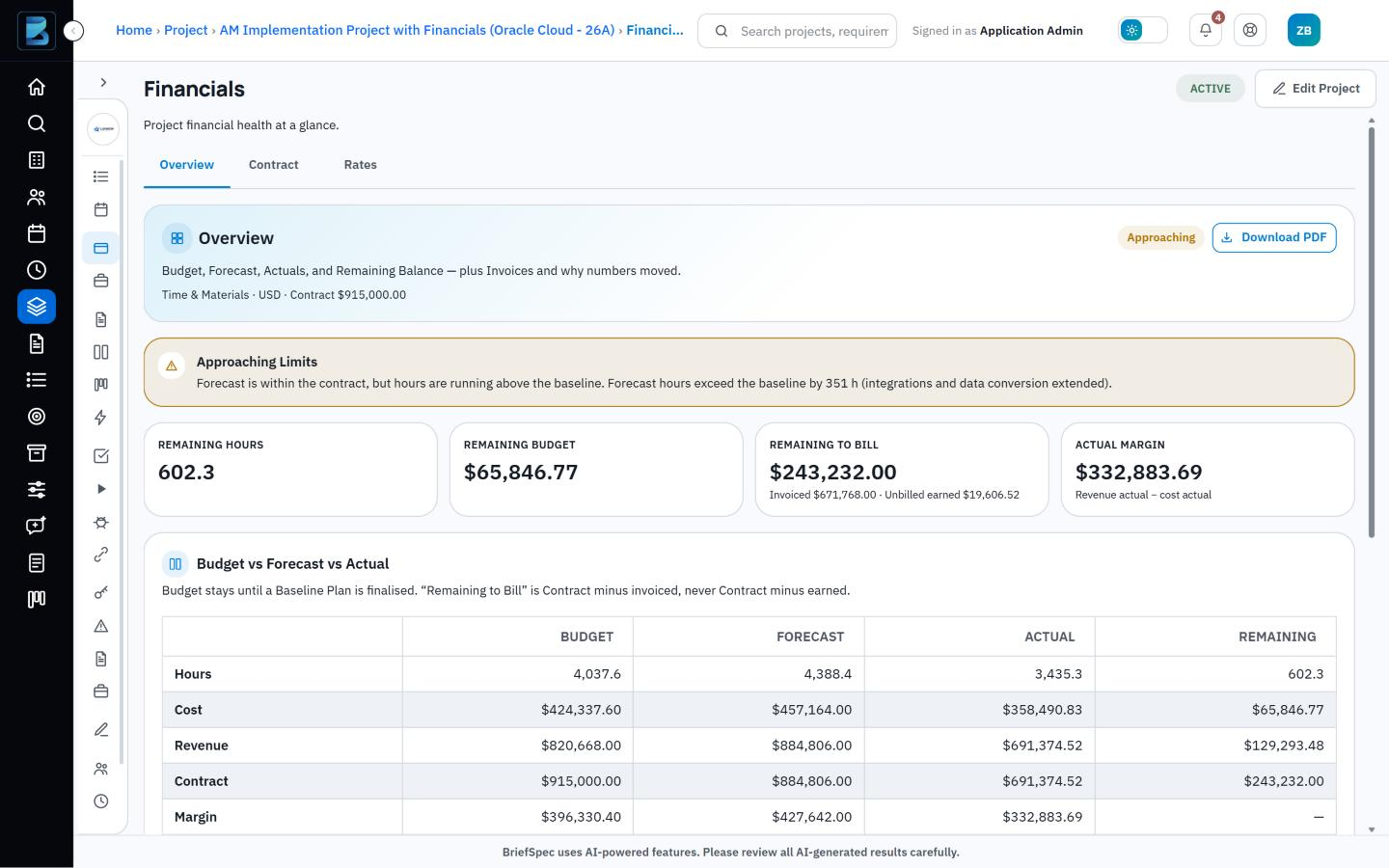
    Image 1: Financials overview. Budget vs. forecast vs. actual with an Approaching Limits status.

    The contract and its change orders

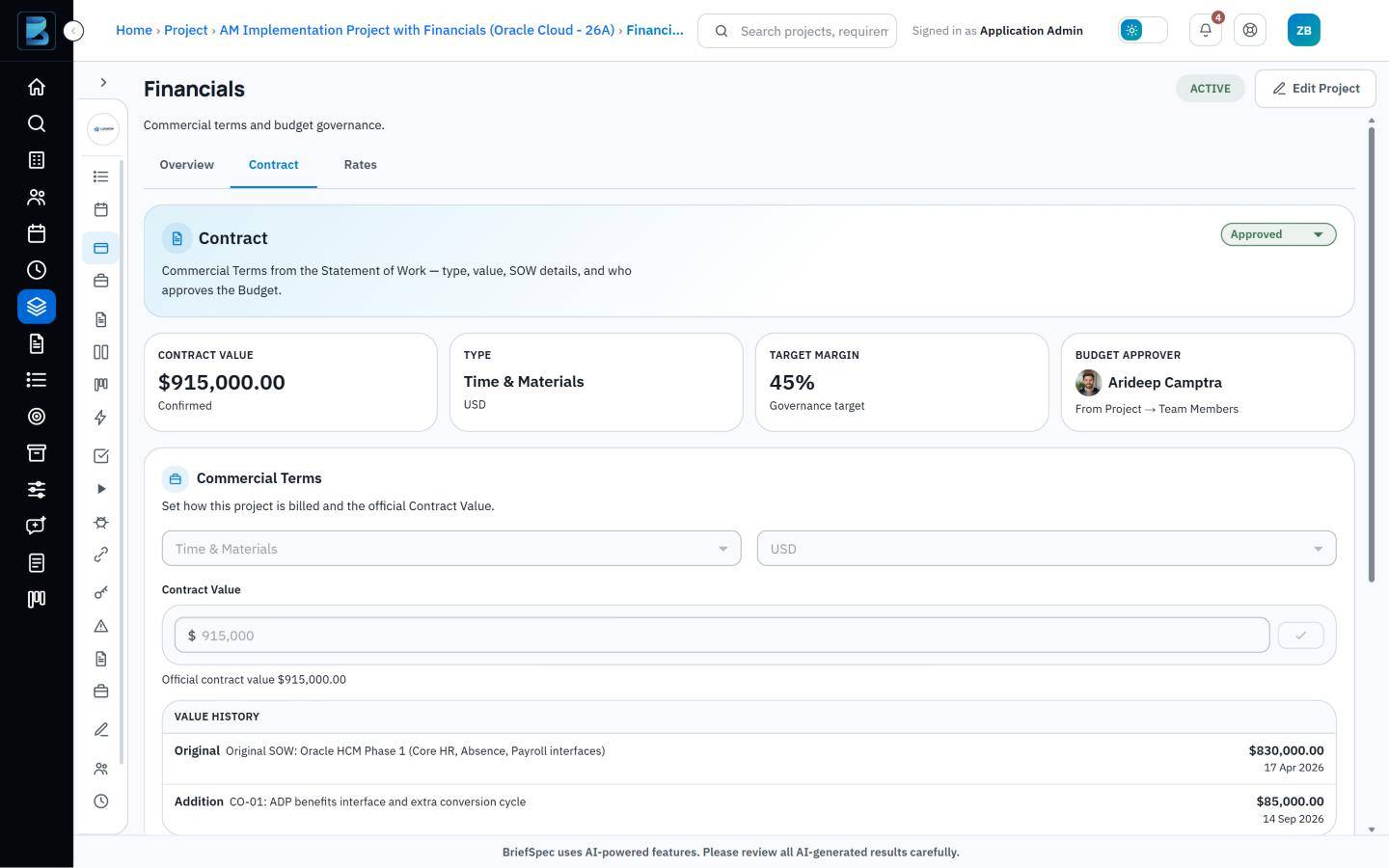
    Everything in Project Financials starts from the contract, because the contract determines what the project is worth and how it will be billed. The project record holds the contract type, the currency and the value taken from the SOW, and it can also carry a target margin and a not-to-exceed limit where the engagement calls for one. A named budget approver reviews the contract before any of it counts, and once it has been approved the commercial terms are locked.

    Of course, the value that was signed is seldom the value the project ends on. As change orders are agreed over the course of the implementation, each one is added to the contract with its amount, its effective date and a short note, and the project then shows both the current contract value and the full history of how it got there, which is useful when a client asks why the number has moved.

    Image 2: Contract value history with two change orders, one pending approval.
    Bill rates, cost rates and margin

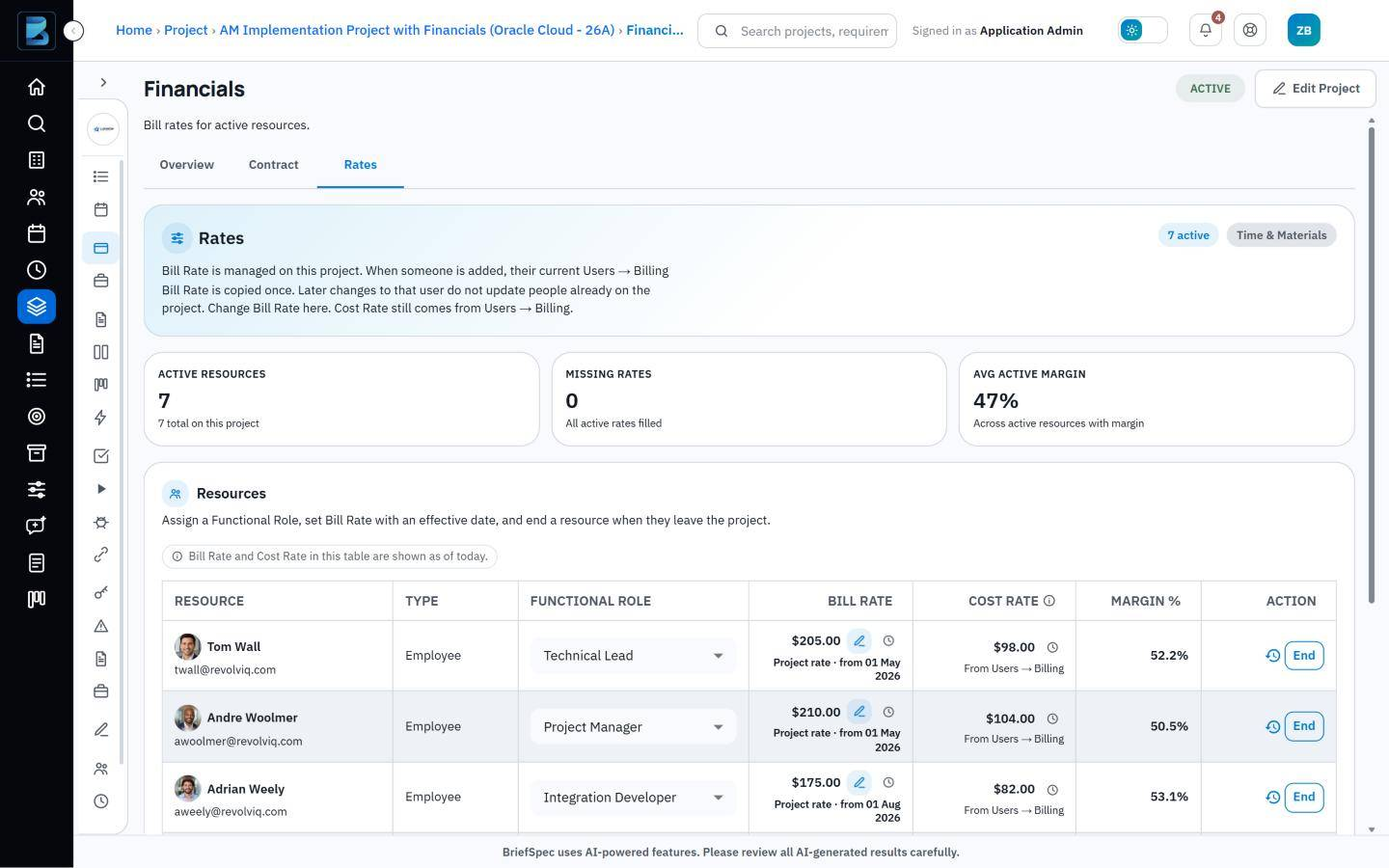
    Rates are handled in much the same way, in that BriefSpec keeps their history and never overwrites it. Each person on a project has two rates. The bill rate is set on the project itself, since the same senior consultant might bill at $200 on one engagement and $185 on another, whereas the cost rate belongs to the person and is drawn from their billing profile.

    Because both rates are date-effective, a new rate takes effect from its start date and the forecast recalculates from that point onward, while the previous rate continues to apply to everything that came before. The margin reported for earlier periods therefore stays as it was when someone’s rate goes up partway through a project. Margin is also shown for each resource, which makes it easier to see how individual roles contribute to the profitability of the engagement.

    Image 3: Resource rates with margin %, plus the rate history for one consultant.

    The baseline plan

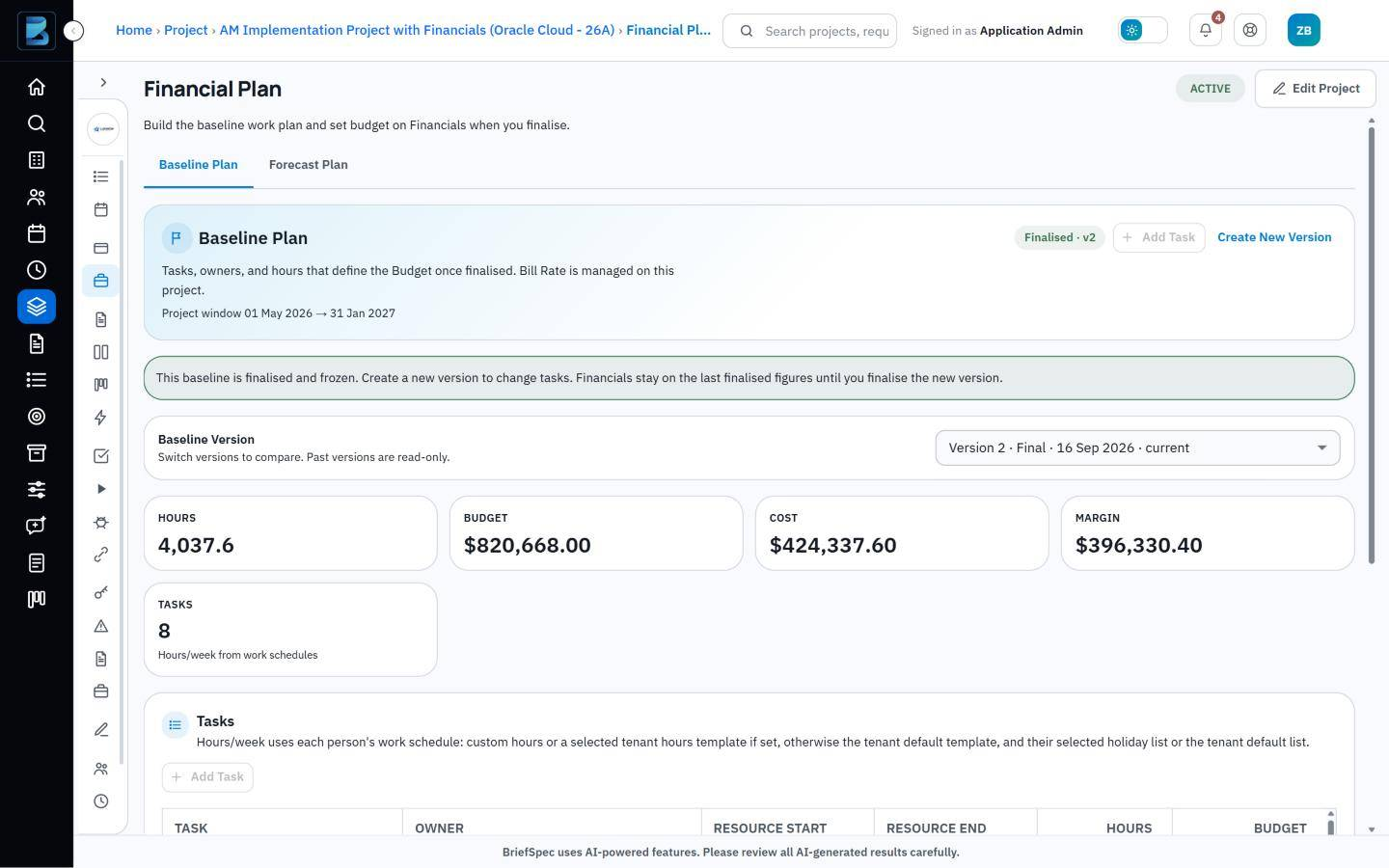
    With the contract and rates in place, the baseline plan sets out how the hours will be spent, broken down by task and by the person or team responsible. Some allocations are steady, with the same number of hours each week, and others are flexible, with the load rising and falling as the project moves through its phases. When the plan has been agreed it is finalized, at which point it is locked and becomes the budget against which the rest of the project is measured.

    Plans do change, and when that happens a new version of the baseline is created and the earlier one is kept alongside it. The PMO can therefore always go back and show what was originally planned, what it was changed to, and when.

    Image 4: A finalized baseline plan with tasks, owners, hours and budget.

    Forecast and actuals

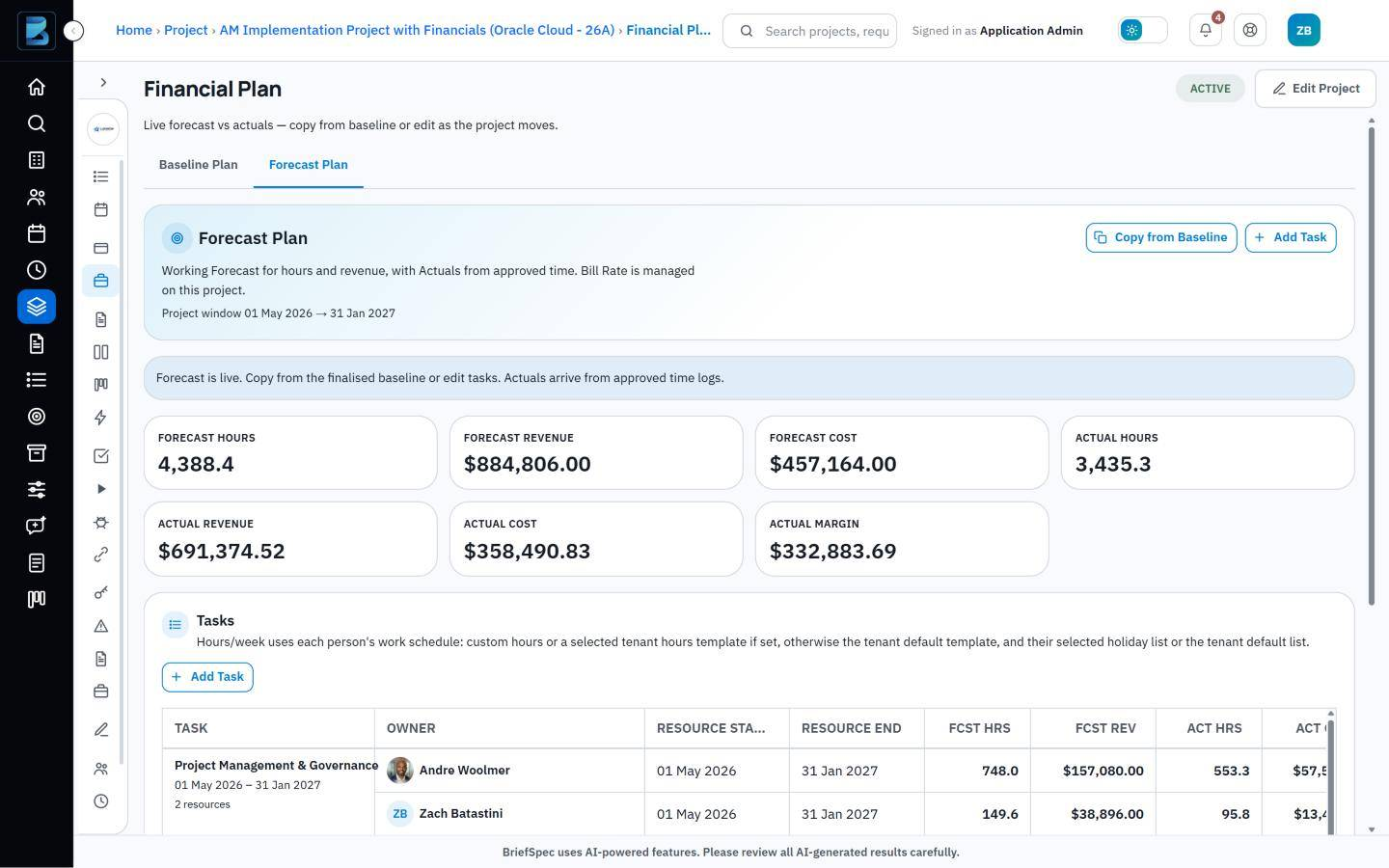
    The forecast begins as a copy of the finalized baseline and from then on serves as the working plan, which project managers adjust as people roll on and off the project and as allocations shift from week to week.

    Image 5: Forecast plan with forecast hours and revenue next to actual hours and cost from approved time.

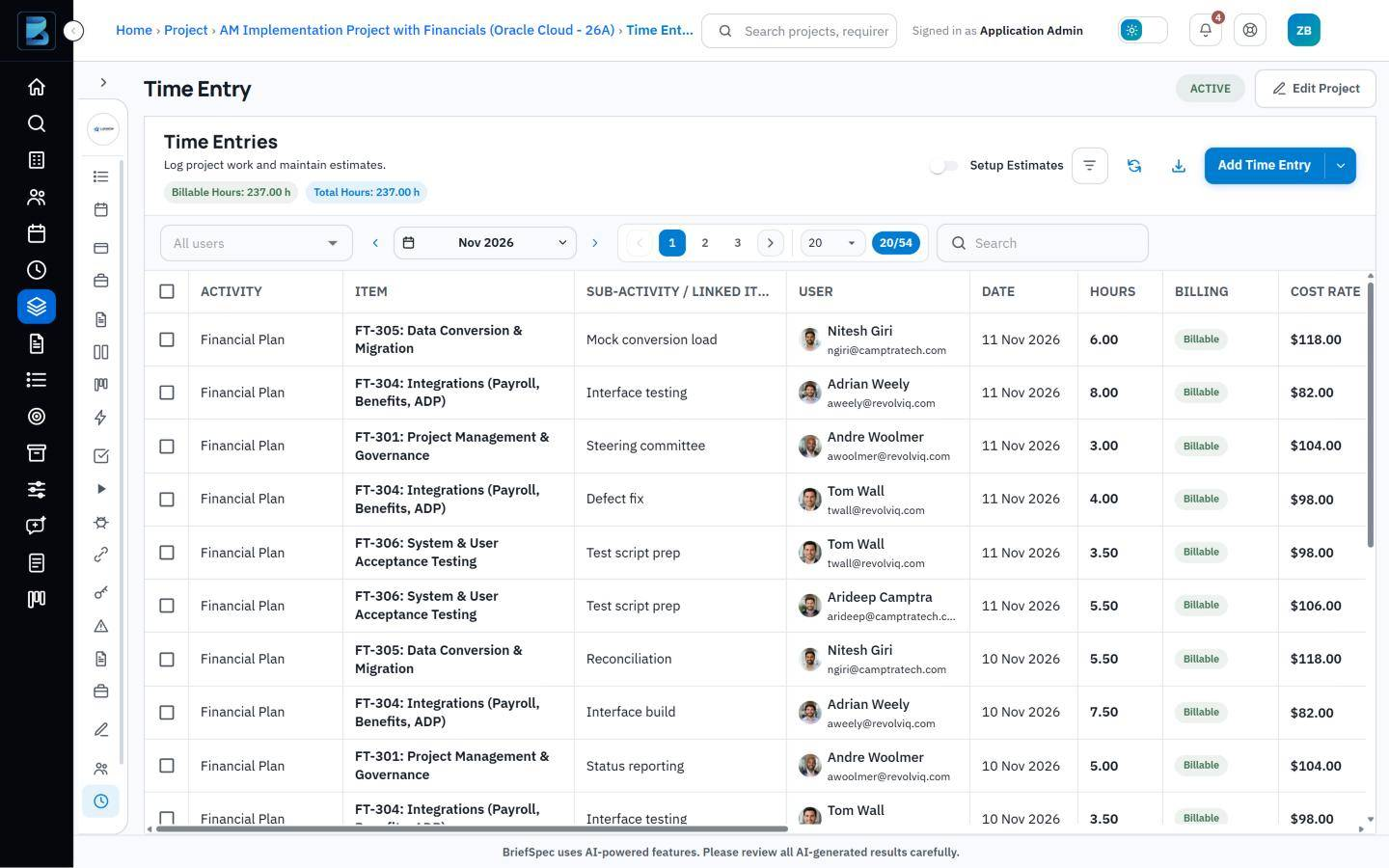
    The actuals that sit alongside the forecast are generated from the time the team logs in BriefSpec against the work they are doing, whether that is a task on the financial plan, a requirement, a test case or a service request. Once the project’s Timesheet Approver has approved those entries, the hours become the project’s actual hours and cost, which means nobody has to export a timesheet or update a spreadsheet at month end to find out where the project stands.

    Image 6: Weekly time entry, with hours logged against plan tasks, a test case, a requirement and a service request.

    The financials overview

    Since the contract, the baseline, the forecast and the actuals all live on the same project, BriefSpec is able to compare them directly, and this is what the financials overview does. It sets budget, forecast and actual figures side by side for hours, cost, revenue and margin, and it shows how many hours and how much budget remain along with the amount still to be billed. A status of On Track, Approaching Limits or Over Budget summarizes the position, and the whole overview can be downloaded as a PDF when it is needed for a status report.

    Invoices are recorded against the project as they go out, so the remaining-to-bill figure reflects what has been invoiced to date.

    When the project changes

    One of the more practical consequences of keeping everything together is that each kind of change has an obvious home. A change in scope or contract value is recorded as a change order, a rate increase is entered as a new rate with its own start date, and a change to the agreed plan becomes a new version of the baseline, while the ordinary week-to-week shifts in staffing and timing are absorbed by the forecast. In every case the earlier position is retained, so the project keeps a complete record of how it arrived at where it is today.

    An example

    The sample project shown in the screenshots illustrates how this works in practice. Its original SOW was signed for $830,000 in April 2026, and a change order in September added a further $85,000 for a benefits interface and an extra conversion cycle, bringing the contract value to $915,000.

    The baseline plan allowed for 4,037.6 hours, but the integration and data conversion work has taken longer than expected and the forecast now stands at 4,388.4 hours, some 351 hours above the baseline. Forecast revenue of $884,806 is still within the contract, which is why BriefSpec shows the project as Approaching Limits and not yet Over Budget. To date, 3,435.3 hours have been logged, $671,768 has been invoiced and $243,232 remains to be billed.

    The delivery manager can see all of this while roughly 600 of the baseline hours are still unused, which leaves enough time to adjust the scope, revise the forecast or raise a further change order.

    Access to financial data

    Because rates and margin are sensitive, access to them is controlled through project roles. Financials and Financial Plan are separate permissions, each of which can be set to Hidden, Read, or Read and Edit, and anyone without financial access will find that cost and bill rates are hidden from them in the time entry list. Cost rates also cannot be changed from within a project, since they are maintained on each person’s billing profile.

    What is included today

    This first release supports time and materials contracts, including those with a not-to-exceed limit. Fixed-fee contracts can already be recorded in BriefSpec, although fixed-fee budgeting is not yet available, and internal projects are treated as non-billable and therefore carry no budget.

    Each project is tracked in a single currency, and invoices are recorded manually with a date, an amount and a note. There is no direct integration with accounting systems at this stage.

    Getting started

    Project Financials is included in the Business and Enterprise plans and is switched on for each project through the Track Financials setting, after which the Financials and Financial Plan pages appear under Budgeting.

    If you are new to BriefSpec, you can book a demo, and we will build a baseline with you using one of your live projects so that you can see your own figures. More information is available on the Project Financials page, and you can also try BriefSpec for free.

    Frequently asked questions

    Which plans include Project Financials?

    Project Financials is included in the Enterprise plan.

    Which contract types are supported?

    Time and materials contracts are supported, including those with a not-to-exceed limit. Fixed-fee contracts can be recorded, although fixed-fee budgeting is not yet available, and internal projects carry no budget.

    Can a baseline plan be changed after it is finalized?

    Once a baseline has been finalized it is locked. If the plan needs to change, a new version is created and the earlier version is kept for reference.

    Where do actual hours and costs come from?

    They come from the time that people log in BriefSpec against plan tasks, requirements, test cases and service requests, and the hours count as actuals once they have been approved.

    What happens to earlier figures when someone’s rate changes?

    Earlier figures are not affected. Bill and cost rates are date-effective, so a new rate applies from its start date and the previous rate continues to apply to the work that came before it.

    Who can see rates and margin?

    That depends on the person’s project role, because Financials and Financial Plan can each be set to Hidden, Read, or Read and Edit.

    Can the financial data be exported?

    The financials overview can be downloaded as a PDF, although there is no direct integration with accounting systems at this stage.

  • From SOW to Execution Plan: How AI Supports Enterprise Implementations

    From SOW to Execution Plan: How AI Supports Enterprise Implementations

    From SOW to Execution Plan: How AI Supports Enterprise Implementations

    Quick summary: AI project planning for enterprise implementations uses artificial intelligence to turn SOWs and source documents into structured, reviewable implementation context. In BriefSpec, that means helping teams extract requirements and scope items, connect them to project plans, phases, formal test cycles, defects, and traceability, and keep human review at the center of project execution.

    What is AI Project Planning for Enterprise Implementations?

    AI project planning in enterprise software implementations uses artificial intelligence to help convert source documents, such as a Statement of Work (SOW), discovery notes, requirements spreadsheets, or implementation templates, into structured project information that teams can review and govern. It is not a replacement for project managers, implementation consultants, business analysts, or testing leads. It is a way to reduce manual transcription, preserve project context, and create a stronger starting point for execution.

    A Statement of Work is the document that defines agreed implementation scope, deliverables, responsibilities, assumptions, timeline, and commercial engagement. An execution plan is the governed set of project phases, workstreams, requirements, tasks, owners, testing activities, defects, decisions, and readiness signals used to manage the implementation from kickoff through go-live.

    For ERP, HCM, payroll, finance, CRM, and similar enterprise software implementations, the planning problem is rarely just task creation. Teams need to understand what is in scope, which requirements must be delivered, how workstreams depend on one another, whether requirements are covered by test cases, which defects are blocking progress, and what project information is current. AI project planning is most useful when it operates on that connected implementation context rather than treating every document or prompt as an isolated task.

    BriefSpec is an AI-native project execution platform purpose-built for this environment. It helps teams turn SOWs and source documents into structured requirements, create and manage test cases, track defects, maintain requirements-to-test traceability, manage project plans and phases, import existing implementation data, and ask questions about live project context through implementation intelligence. Human review remains central: teams review, edit, approve, and govern AI-assisted outputs before they become part of the execution baseline.

    How AI Transforms SOW to Execution Plan Workflows

    How AI Supports SOW-to-Execution Workflows

    Translating a detailed SOW into an actionable implementation plan traditionally demands significant manual effort. Project managers, business analysts, functional leads, and test managers often spend hours dissecting documents, reconciling spreadsheets, identifying scope gaps, and determining whether requirements, tests, defects, and status reports agree with one another.

    AI can reduce that manual effort by creating structured first drafts for review. The most practical workflow is not “AI creates the whole project plan and the team accepts it.” A governed workflow is: source document intake, extraction review, requirement approval, phase and workstream mapping, test coverage review, defect linkage, and readiness reporting.

    Source Document Intake

    The process starts with implementation source material: SOWs, requirements workbooks, discovery outputs, design notes, configuration documents, testing spreadsheets, or system-integrator templates. BriefSpec helps teams bring that content into a connected workspace so it can be structured, reviewed, and linked to downstream execution artifacts.

    AI-Assisted Extraction and Structuring

    BriefSpec uses AI to help identify candidate requirements, scope items, workstreams, and implementation context from source documents. The goal is to create structured records that a project team can validate, not to assume every extracted item is final. This is especially important when an SOW contains ambiguous scope language, missing assumptions, duplicated deliverables, or content owned by multiple implementation partners.

    Structured Planning and Lifecycle Integration

    Once requirements and scope items are reviewed, teams can connect them to project plans, phases, formal test cycles, defects, and traceability. This matters because enterprise implementation plans are only useful when they remain tied to the actual work being delivered and validated. A requirement should not live in one spreadsheet, its test case in another tool, its defect in a ticketing system, and its status in a manual slide deck.

    Human Review and Refinement

    Human expertise remains central to AI project planning. Implementation leads, workstream owners, business analysts, and test managers review AI-assisted drafts, validate source context, adjust wording, confirm ownership, and decide what belongs in the approved execution baseline. AI provides a faster starting point; the delivery team provides judgment, governance, and accountability.

    Example: From SOW Clause to Traceable Execution Context

    Source artifact Structured implementation record Connected execution use
    SOW scope clause Candidate business or functional requirement Reviewed and approved as part of the requirements baseline
    Workstream reference Payroll, Core HR, Finance, Integrations, Reporting, Security, or another workstream Mapped to project phases, owners, test cycles, and status views
    Acceptance or validation language Draft test scenario or test case input Used to build SIT, UAT, regression, or readiness testing coverage
    Assumption, dependency, or exclusion Risk, decision, or clarification item for review Tracked before it becomes a delivery blocker or scope dispute
    Testing or readiness requirement Requirement-to-test traceability item Included in RTM coverage and go-live readiness review
    Defect found during testing Linked defect record Connected back to the requirement, test case, owner, and resolution status

    Why AI-Native Planning Matters for Enterprise Governance and Risk

    Effective governance and proactive risk management are essential in complex enterprise software implementations. Fragmented tools and manual processes make it difficult to maintain a clear, audit-ready record of what was agreed, what has changed, what has been tested, and what remains at risk.

    Establishing One Source of Truth

    AI-native planning is most valuable when it contributes to a connected implementation workspace. BriefSpec brings requirements, project plans, formal test cycles, defects, documentation, reporting, and traceability into one source of truth. That connected model gives governance leaders end-to-end visibility across scope, delivery progress, test coverage, and unresolved issues.

    Identifying Risk Earlier

    Structured implementation data helps teams identify risk earlier. A missing requirement, unclear owner, untested process, unresolved defect, or scope assumption is easier to see when requirements, tests, defects, and project status are connected. BriefSpec helps preserve project context so teams can review gaps, ask better questions, and make decisions before issues become go-live problems.

    Improving Audit-Ready Traceability

    Traceability connects implementation scope and requirements to downstream test cases, execution results, defects, and related project artifacts. For enterprise implementations, this is especially important during SIT, UAT, regression testing, payroll parallel testing, and readiness reviews. A connected traceability model helps teams demonstrate which requirements were validated and where open defects or coverage gaps remain.

    Supporting Delivery Confidence

    Delivery confidence improves when teams can see the current implementation picture without manually reconciling spreadsheets, documents, tickets, and status reports before every meeting. BriefSpec supports reporting and implementation intelligence by allowing teams to work from live project context, including requirements, testing, defects, ownership, and traceability.

    Practical Application: Implementing AI Project Planning with BriefSpec

    Practical Application: Implementing AI Project Planning with BriefSpec

    Translating AI project planning into operational value requires more than a generic task tracker. Enterprise implementation teams need a purpose-built execution layer that reflects how ERP, HCM, payroll, finance, CRM, and other enterprise software projects actually run: scope, workstreams, requirements, configuration, integrations, testing, defects, reporting, and go-live readiness.

    From SOWs to Structured Requirements

    BriefSpec helps teams turn SOWs and source documents into structured requirements for review. Instead of manually re-entering implementation scope into disconnected spreadsheets, teams can create a governed requirements baseline and maintain the source context behind each item.

    AI-Assisted Test Case Generation

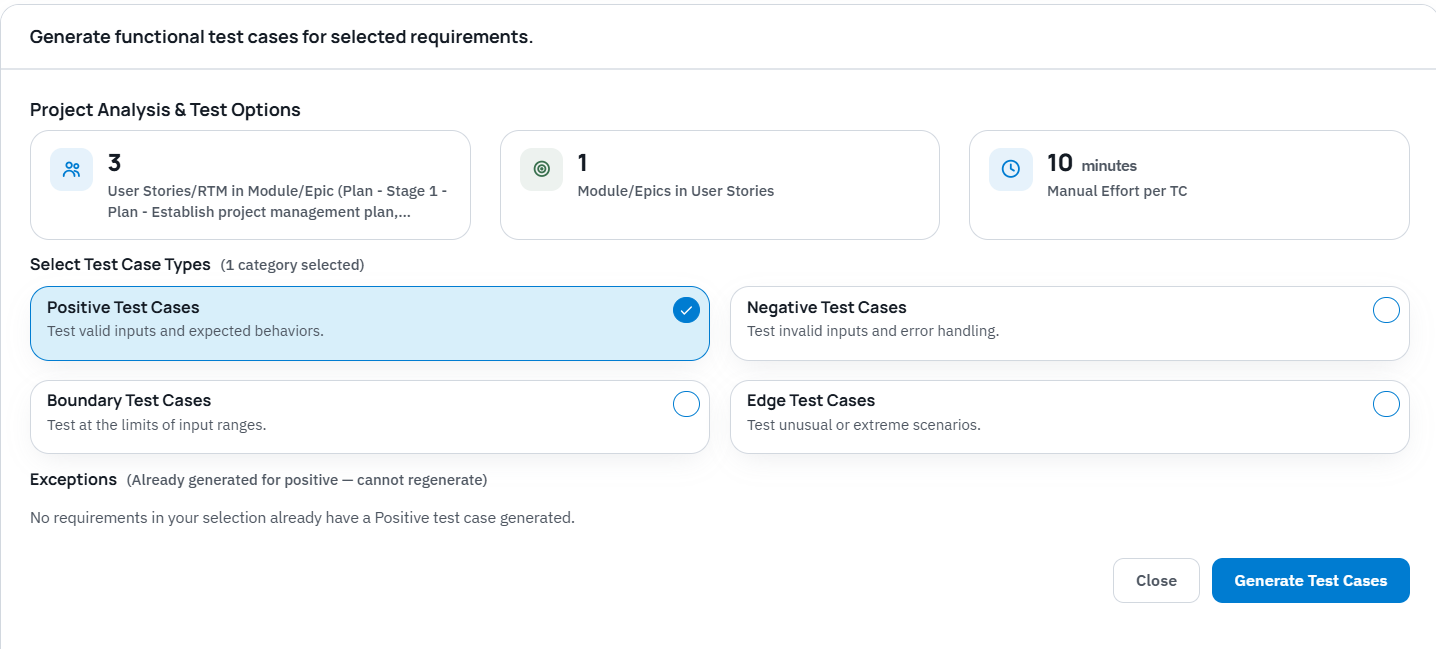
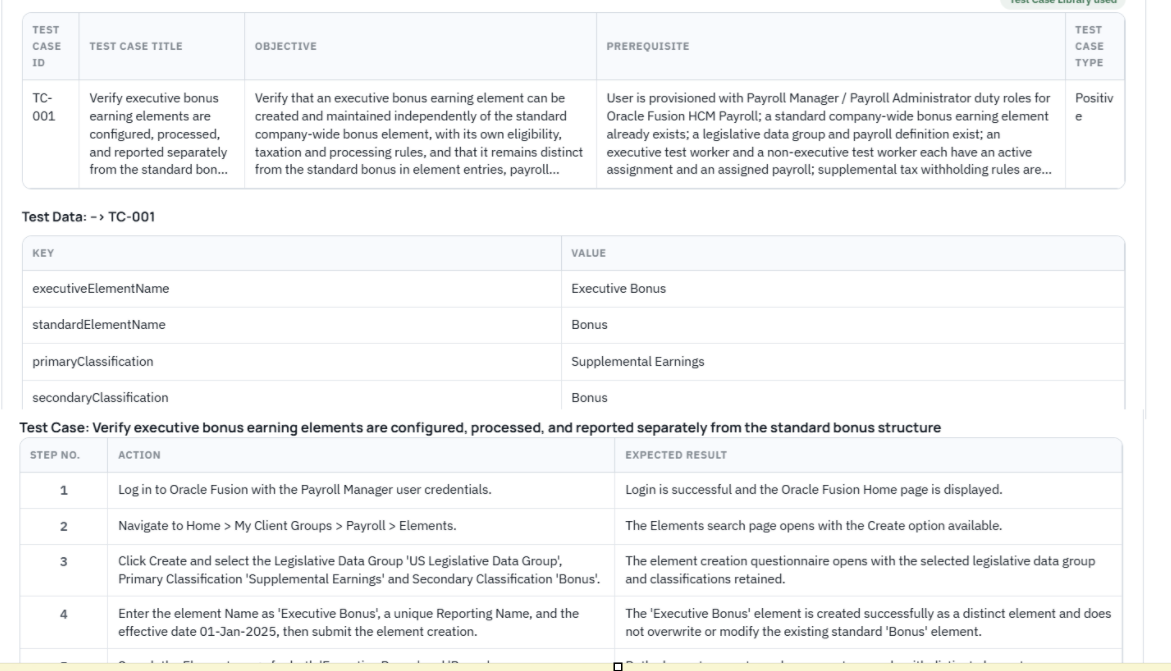
    From approved implementation content, BriefSpec can help generate draft test cases for human review. This supports formal test cycles such as SIT, UAT, regression testing, payroll parallel testing, and readiness testing. Test managers can review the AI-assisted output, adjust test steps and expected results, and connect coverage back to approved requirements.

    Connected Project Plans, Phases, Testing, and Defects

    BriefSpec connects implementation artifacts across the lifecycle. Requirements can be linked to project plans, phases, test cases, test execution, defects, documentation, and traceability views. This reduces the risk of project knowledge becoming fragmented across spreadsheets, SharePoint folders, Jira or Azure DevOps tickets, testing files, Teams messages, and consultant deliverables.

    Human Review and Collaborative Refinement

    AI accelerates repetitive implementation work, but human expertise governs. BriefSpec provides a workspace where implementation teams can review, adjust, approve, and enrich AI-assisted outputs. This review step is essential for validating accuracy, incorporating project-specific nuance, and ensuring alignment with stakeholder expectations.

    Implementation Intelligence Through Live Project Context

    BriefSpec’s implementation intelligence helps teams ask questions about live project data instead of searching through disconnected files. For example, a project leader may need to know which requirements are not covered by test cases, which UAT defects are tied to a critical workstream, or which scope items still need clarification before readiness review.

    Practical Human-Review Checklist

    • Confirm that each AI-assisted requirement is grounded in an approved source document or agreed stakeholder input.
    • Remove duplicates created from overlapping SOW sections, templates, or requirements spreadsheets.
    • Assign or confirm the correct workstream, module, priority, and owner where applicable.
    • Flag ambiguous scope, missing assumptions, exclusions, or dependency questions for resolution.
    • Review generated test cases for realistic prerequisites, steps, expected results, and data needs.
    • Check requirements-to-test coverage before SIT, UAT, regression testing, and go-live readiness reviews.
    • Link defects back to the relevant requirement and test case so impact is visible.

    Where BriefSpec Fits Compared with Generic Project Tools

    Generic project management tools can track tasks, assignments, boards, dates, and status updates. Product planning tools can support roadmaps, ideas, and strategy-to-delivery workflows. Testing tools can manage test execution. Enterprise implementation teams often use several of these tools at once, but still struggle to keep requirements, testing, defects, scope, ownership, and project status connected.

    BriefSpec is different because it is built around the enterprise implementation lifecycle. It is not simply a task board or a test repository. It connects requirements, project plans, phases, formal test cycles, defects, traceability, documentation, reporting, and AI-assisted project intelligence in one workspace.

    Tool category Typical strength Common gap in enterprise implementations BriefSpec focus
    Generic project management tools Tasks, boards, due dates, and status tracking Requirements, test coverage, defects, and traceability often live elsewhere Connect implementation execution artifacts across the lifecycle
    Issue trackers Ticket management and engineering workflows Scope, requirements, UAT coverage, and readiness context can become disconnected Link defects and issues back to requirements, tests, and implementation context
    Testing tools Test case management and execution tracking Testing may be separated from source scope, requirements, and project governance Maintain requirements-to-test traceability and connect defects to delivery context
    Spreadsheets and documents Flexible capture and familiar collaboration Multiple versions create drift across requirements, tests, status, and ownership Preserve structured implementation data and relationships between artifacts

    FAQ: AI Project Planning for Enterprise Implementations

    Can AI replace project managers or implementation consultants?

    No. AI project planning should support project managers, implementation consultants, business analysts, and test managers by reducing repetitive documentation work and surfacing structured project context. Human review, approval, stakeholder alignment, and delivery accountability remain essential.

    How does AI help convert an SOW into implementation work?

    AI can help extract candidate requirements, scope items, workstreams, assumptions, and testing inputs from an SOW or related source documents. In a governed workflow, the team reviews those outputs, approves the relevant records, and connects them to plans, phases, test cases, defects, and traceability.

    What makes AI project planning different for ERP, HCM, CRM, and payroll implementations?

    Enterprise software implementations require more than a schedule. They involve business requirements, functional configuration, integrations, data conversion, reporting, security, formal test cycles, defects, readiness criteria, and cross-functional ownership. AI is most useful when it operates within that connected implementation lifecycle.

    What should teams watch for when using AI-assisted planning?

    Teams should avoid accepting AI-assisted outputs without review. Common review areas include ambiguous source language, missing assumptions, duplicate requirements, incorrect workstream mapping, unrealistic test scenarios, and gaps between approved scope and test coverage.

    Key takeaways

    • AI project planning helps enterprise implementation teams turn SOWs and source documents into structured, reviewable implementation context.
    • BriefSpec supports AI-assisted SOW and document-to-requirement extraction, AI-assisted test case generation, project plans and phases, defects, traceability, reporting, and implementation intelligence.
    • Human review is essential. AI can create useful drafts and surface context, but teams remain responsible for validating, approving, and governing project content.
    • Connected requirements, project plans, formal test cycles, and defects give teams a stronger foundation for audit-ready traceability and go-live readiness.
    • The practical value of AI-native planning is earlier risk identification, less manual reconciliation, stronger project context, and greater delivery confidence.


  • How Systems Integrators Can Prevent Scope Creep and Protect Project Margins

    How Systems Integrators Can Prevent Scope Creep and Protect Project Margins

    How Systems Integrators Can Prevent Scope Creep and Protect Project Margins

    Quick summary: Systems integrator scope creep is the uncontrolled expansion of requirements, deliverables, or work beyond the agreed Statement of Work without approved changes to budget, timeline, or resources. For enterprise software implementation teams, preventing scope creep depends on clear SOWs, governed requirements, formal change control, traceability from scope through testing, and a connected project execution record. BriefSpec helps SI delivery teams make scope changes visible, reviewable, and traceable across requirements, project plans, formal test cycles, defects, decisions, and documentation.

    What is Systems Integrator Scope Creep?

    Systems integrator scope creep refers to the uncontrolled expansion of project requirements, deliverables, or work beyond the initial Statement of Work (SOW) without corresponding adjustments to budget, timeline, or resources. In enterprise software implementations, it is a common driver of eroded project margins, missed milestones, rework, and reduced delivery confidence.

    Unlike a formal change request, which is a deliberate and approved adjustment, scope creep often appears gradually. It can stem from vaguely defined requirements, informal client requests, unclear decision authority, poor communication channels, or a lack of structured traceability between the SOW and actual project execution. This incremental expansion is difficult to manage when requirements, test cases, defects, approvals, and project status live in disconnected spreadsheets and documents.

    For an SI, the commercial risk is especially clear on fixed-fee projects. Each unapproved workshop, configuration change, report, integration adjustment, test cycle, or documentation update consumes delivery capacity. If the work is not tied back to approved scope or handled through change control, the team absorbs effort that should have been reviewed, reprioritized, or commercially addressed.

    Formal change request Scope creep
    Documented, reviewed, estimated, and approved before delivery work proceeds. Added through informal requests, assumptions, or undocumented decisions.
    Includes impact on scope, timeline, resources, testing, and commercial terms. Often discovered after effort has already been spent.
    Creates an audit-ready record of approval and rationale. Creates ambiguity when clients and delivery teams disagree about what was agreed.
    Can add value when governed properly. Reduces control when work expands without governance.

    How Uncontrolled Scope Erodes SI Project Profitability

    Uncontrolled scope is more than an inconvenience; it reduces delivery capacity and makes project outcomes harder to predict. Each unbilled task or undocumented requirement consumes consultants, functional leads, testers, architects, and project managers who were already allocated to an agreed plan.

    Silent Margin Erosion and Late Budget Overruns

    The financial impact of scope creep is often not obvious when the first request arrives. A client asks for a small reporting change. A workstream lead adds a field to a configuration decision. A test cycle expands because requirements were never clearly accepted. Individually, these additions can look manageable. Across a complex ERP, HCM, payroll, finance, or CRM implementation, they accumulate into meaningful delivery effort.

    When the implementation record is fragmented, delivery leaders may not see the pattern until the project is already behind plan. The safer operating model is to connect scope, requirements, decisions, test coverage, defects, and project status so scope movement can be identified earlier and reviewed against the SI’s commercial controls.

    Increased Rework and Client Disputes

    Unstructured requirements and weak traceability increase the risk that teams configure, build, test, or document the wrong thing. Rework then appears as a delivery issue, even when the root cause was an ungoverned requirement change or an unclear acceptance boundary.

    Undocumented changes and unclear scope boundaries also create client disputes. BriefSpec addresses this by providing a connected implementation workspace where requirements, test cases, defects, key decisions, approvals, and documentation can be maintained as shared project context. That record helps delivery teams preserve why decisions were made, what was approved, and how downstream work relates to agreed scope.

    • Requirements appear in multiple versions across Excel, SharePoint, email, and slide decks.
    • Workstream teams accept client requests without confirming SOW alignment.
    • Testing uncovers requirements that were never formally reviewed or accepted.
    • Defects are used to introduce new functionality rather than correct agreed behavior.
    • Project status reports show progress, but cannot prove which requirements are tested and accepted.
    • Client stakeholders disagree about who can approve scope changes.
    The Role of Connected Requirements and Traceability in Prevention

    The Role of Connected Requirements and Traceability in Prevention

    Effective scope management depends on structured requirements and end-to-end traceability. A requirement is a documented business, functional, technical, integration, reporting, security, conversion, or other implementation need that must be delivered and validated. Traceability is the ability to connect that requirement to downstream test cases, execution results, defects, decisions, and related project artifacts.

    BriefSpec creates a connected implementation record by organizing requirements hierarchically from epics or modules down to child requirements. This structure makes scope easier to review by workstream, owner, phase, and downstream validation status. Scope changes become visible events that can be reviewed rather than silent additions buried in separate trackers.

    Establishing a Traceable Backlog

    A traceable backlog is one of the strongest controls against systems integrator scope creep. Every requirement, whether originating from the SOW, discovery, design workshops, data conversion analysis, integration planning, or UAT feedback, should be connected to its source and current approval status.

    BriefSpec links requirements to test cases and defects so teams can evaluate coverage and impact. If a requirement changes, the team can identify affected test cases, related defects, workstream owners, and documentation that may need review. This helps prevent implementation work from moving forward without a clear purpose inside the project’s governed scope.

    Governing Scope Changes with Key Decisions

    Beyond initial setup, maintaining scope requires governance. Documenting key decisions and securing client sign-offs provides an audit-ready trail. When a client questions whether a change was approved, or an internal leader asks why work expanded, the decision record preserves the rationale and approval context.

    This is especially important when project knowledge would otherwise remain in consultant notes, Teams conversations, email threads, or individual spreadsheets. A governed decision log prevents critical context from leaving with a departing team member and makes scope adjustments deliberate rather than accidental.

    Leveraging AI-Native Platforms for Proactive Scope Management

    Using an AI-Native Platform for Proactive Scope Management

    Combating scope creep effectively requires more than a generic task tracker. Systems integrators need a connected, structured view of the implementation lifecycle. BriefSpec is an AI-native project execution platform purpose-built for enterprise software implementations, connecting requirements, project plans, phases, formal test cycles, defects, traceability, reporting, documentation, and implementation intelligence in one workspace.

    AI in this context should accelerate repetitive implementation work while preserving human review and approval. It should help teams structure existing project data, identify relationships, generate first drafts, and answer questions grounded in live project context—not replace implementation professionals or bypass governance.

    Streamlining Requirements Ingestion with AI

    Bringing client requirements into a structured format often consumes significant effort. BriefSpec’s AI-powered Excel import and structured import capabilities help teams ingest client-provided requirements while preserving hierarchy from epics or modules down to child items. Smart Merge can help reconcile imported implementation content with existing project records to reduce duplicate or conflicting data.

    This matters because many SI engagements begin with source material that already exists: SOWs, discovery notes, requirements spreadsheets, process documents, design artifacts, testing files, and consultant templates. Turning those materials into structured, reviewable requirements early reduces the chance that scope ambiguity becomes delivery risk later.

    Connecting Delivery Signals to Commercial Review

    BriefSpec should not be positioned as a replacement for an SI’s PSA, ERP, time-tracking, invoicing, or commercial systems unless those financial workflows are separately configured. Its role is to make delivery scope and execution risk clearer by connecting requirements, plans, testing, defects, decisions, and documentation.

    That connected visibility supports better commercial discipline. When a requirement expands, a test cycle grows, a defect reveals a scope gap, or a client requests additional deliverables, the SI can identify the delivery impact earlier and route the issue through the appropriate change-control and commercial review process.

    Automating Documentation and Protecting Delivery Capacity

    A meaningful portion of fixed-fee implementation time is often spent reformatting project data into client deliverables such as business requirements documents, functional design documents, traceability matrices, testing summaries, and steering-committee updates. BriefSpec’s documentation generation capabilities can reduce manual documentation effort by generating project documents from maintained implementation records.

    This can help protect margin by reducing repetitive rework and transcription effort. Generated deliverables should still be reviewed by the delivery team, and they reflect the latest approved project data only when the underlying BriefSpec records are maintained and current.

    Implementing Best Practices for Sustainable SI Project Profitability

    Achieving and sustaining profitability in enterprise software implementations requires more than identifying scope creep after it happens. SIs need a proactive, structured approach to project execution that makes scope, ownership, approvals, testing, and documentation visible throughout the implementation lifecycle.

    Establish a Governed Statement of Work (SOW)

    The foundation of any successful implementation is a clear, detailed Statement of Work. This document should go beyond high-level objectives and define measurable deliverables, responsibilities, assumptions, out-of-scope items, acceptance criteria, decision authority, and change-control expectations.

    Connect SOW line items directly to requirements and test cases where possible. This makes it easier to show whether work traces back to agreed scope and harder for unapproved work to enter the project unnoticed.

    Implement Robust Change Control

    Scope modifications are inevitable, but they must be deliberate. A robust change-control process ensures that any proposed scope adjustment is formally documented, reviewed for impact on timeline, resources, testing, documentation, and commercial terms, and explicitly approved by the right stakeholders before delivery work proceeds.

    BriefSpec supports this operating model by giving teams a shared implementation record where requirements, decisions, approvals, test coverage, defects, and documentation can be connected and reviewed.

    Utilize a Connected Project Execution Platform

    A purpose-built, AI-native project execution platform like BriefSpec helps maintain scope control by connecting requirements, project plans, phases, testing, defects, traceability, reporting, and documentation within one workspace. This end-to-end visibility makes project artifacts traceable and helps teams identify scope movement before it becomes a late-stage delivery issue.

    Scope-control practice How BriefSpec supports it
    Turn SOW and source documents into structured requirements. AI-assisted document and Excel import helps teams create reviewable requirements with hierarchy and ownership.
    Maintain requirements-to-test traceability. Requirements can be linked to test cases, formal test cycles, execution results, and defects.
    Preserve decisions and approvals. Key decisions and project context can be captured in the implementation workspace for audit-ready review.
    Reduce manual documentation work. Documentation can be generated from maintained project records and reviewed by the delivery team.
    Answer project questions faster. BriefBot provides natural-language implementation intelligence grounded in connected project data.

    Foster a Culture of Proactive Scope Management

    Technology alone is not sufficient. Train project teams on scope discipline, decision authority, change control, and traceability. Conduct regular scope reviews with clients and internal delivery leaders to confirm alignment, identify potential creep early, and decide whether new requests belong in the current implementation, a formal change request, or a future phase.

    This creates shared context and a delivery culture where scope control is part of everyday execution rather than a late-stage escalation.

    • Define measurable deliverables and acceptance criteria in the SOW.
    • Name the client stakeholders authorized to approve scope changes.
    • Separate defects from enhancement requests during testing triage.
    • Trace every requirement to source, owner, status, and validation evidence.
    • Review scope changes for downstream impact on configuration, integrations, data, reporting, security, testing, training, and documentation.
    • Maintain a decision log for scope, design, and acceptance decisions.
    • Use formal test cycles such as SIT, UAT, regression, and readiness testing to validate agreed requirements.
    • Keep documentation generated from current, approved implementation records.
    • Escalate commercial impact through the SI’s approved change-control process.
    • Review scope health regularly with both delivery leadership and client stakeholders.

    Key takeaways

    • Systems integrator scope creep is uncontrolled work expansion beyond the agreed SOW without approved adjustments to scope, timeline, resources, or commercial terms.
    • Scope creep often starts with unclear requirements, informal client requests, weak decision authority, disconnected project artifacts, and poor traceability.
    • A connected implementation record helps SIs make scope changes visible, governed, and reviewable across requirements, testing, defects, decisions, and documentation.
    • BriefSpec supports scope control by connecting requirements, project plans, formal test cycles, defects, traceability, reporting, documentation, and implementation intelligence in one workspace.
    • AI-assisted import, Smart Merge, documentation generation, and BriefBot can reduce manual effort while keeping human review and approval at the center of delivery governance.


  • Why software retests happen more than anyone plans for

    Why software retests happen more than anyone plans for

    Why software retests happen more than anyone plans for

    By Arideep Mukherjee, Founder, BriefSpec · 7 minute read

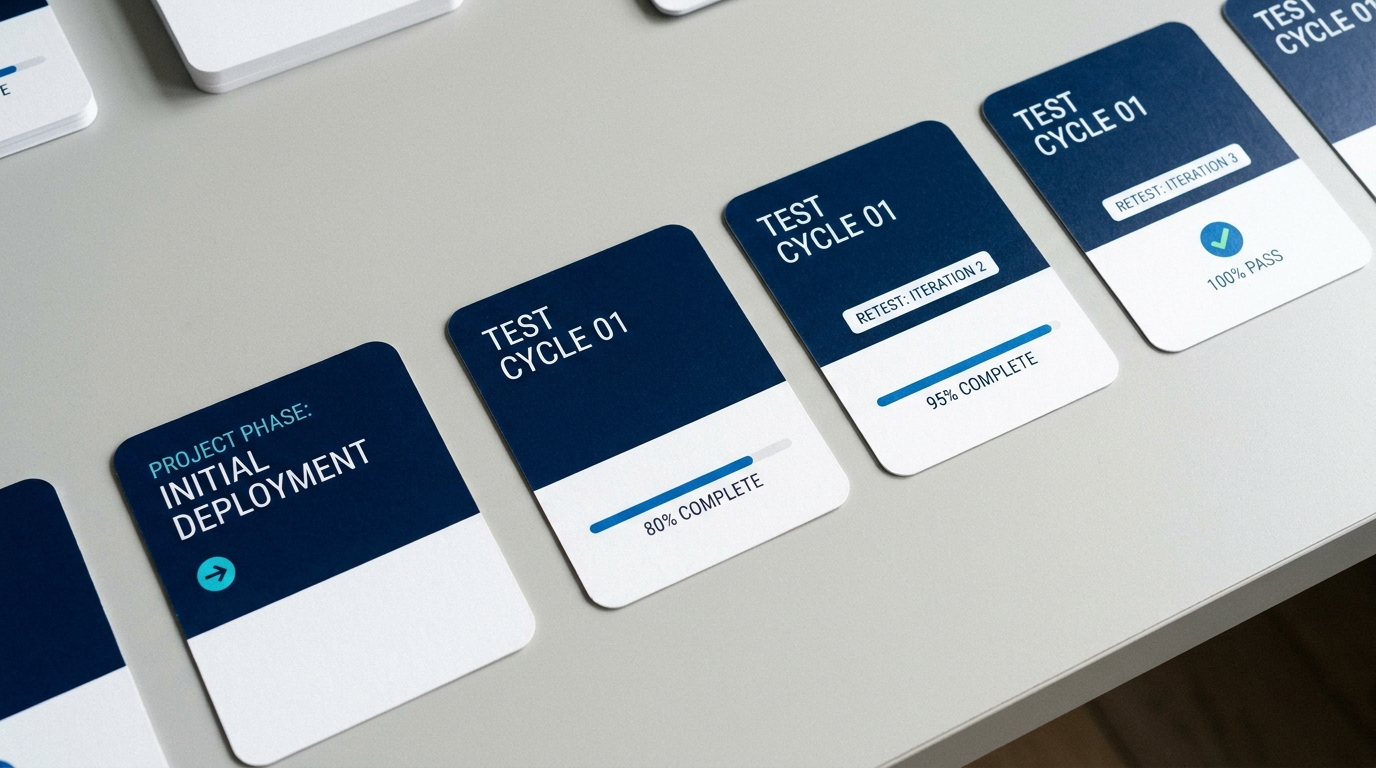
    In short: In many enterprise software implementations, software retests are common enough that they should be planned for rather than treated as exceptions. Vendor releases, environment refreshes, late design changes, tester turnover, audit findings and failed cycles all send a project back to re-execute tests it had already marked done. On spreadsheets that often means rebuilding the tracker and redistributing files. In dedicated test tools it is better, but implementation-specific context such as assignments, workstreams, instructions and traceability can still require manual setup. This article covers why retests happen more often than the plan admits, what a clean re-run should preserve, and how BriefSpec clones a test cycle, in whole or in part, so the retest can start quickly without rebuilding the cycle from scratch.

    What is a software retest?

    A software retest is the re-execution of one or more test cases after a defect fix, release, environment change, data change, audit issue or scope change to confirm that the result is still valid. In enterprise software implementations, the word often means more than verifying a single bug. It can mean rerunning all or part of a formal SIT, UAT, regression, payroll parallel or readiness test cycle with a fresh execution status.

    Term Meaning Typical enterprise implementation use
    Retest Run specific cases again to validate a fix, change or previously invalid execution. Re-run failed UAT cases after defects are fixed, or re-run affected cases after a data reload.
    Regression testing Run selected coverage to confirm a change did not break related functionality. Re-run payroll, benefits and integration cases after a vendor release or configuration change.
    Cycle rerun Run a full or partial formal test cycle again from a blank status. Repeat UAT cycle 1 as UAT cycle 2 because the business did not accept the first cycle.

    Every implementation plan I have seen has one line for system testing, one for acceptance testing, and maybe a line for a parallel run before go-live. None of them have a line for “acceptance testing, cycle 2, because the customer did not accept cycle 1.” Yet on most of the enterprise programs I worked on over 23 years, that second cycle happened, and on a few of them a third one did too.

    The trigger is usually blunt. Cycle 1 finishes with too many open defects, or with pass marks the business does not trust, and the customer’s program lead says the words every project manager dreads: we want the entire cycle run again, and they mean every case, including the ones that passed.

    The request is reasonable. What is unreasonable is how much work it takes to say yes.

    Why retests happen in enterprise implementations

    A failed cycle is the obvious reason, but it is not the only one. Once you list the others, it becomes clear that re-execution is a normal part of delivery rather than an exception.

    One frequent trigger is the vendor’s scheduled release. Many major cloud enterprise platforms publish regular release calendars, and those releases can land during or between formal test cycles. If one lands in the test environment between system testing and acceptance testing, the customer’s change-control policy may require some or all previously signed-off cases to be re-executed, especially where audit evidence must tie to the current build. An environment refresh can also invalidate the assumptions or data behind prior executions. Even if the evidence remains, teams may need to repeat affected cases on the refreshed copy. Any embedded engine that updates on its own schedule, a tax engine or a pricing engine for example, has the same effect on the cases that depend on it, even when nothing else changed.

    Design changes after testing has started are the second family. A late change request, a redesign of a core structure that dozens of other configurations hang off, a re-load of converted data with corrected legacy records. In each case the implementation partner cannot credibly say “only these ten cases are affected” without regression coverage, so the customer asks for the dependent part of the cycle, or all of it, to be redone. A third-party integration changing its file layout mid-project reopens every end-to-end case that crosses that boundary.

    Then there are the people reasons. A tester leaves and the person who replaces them inherits someone else’s pass marks. Most refuse to own them, and they are right to refuse. Sometimes an internal audit finds that the first execution was not done properly: results recorded without evidence, wrong test data, steps skipped. The cycle is invalidated and has to be run again by different testers.

    Some retests are scheduled by design. A payroll or billing go-live plan often calls for two or three parallel runs against the legacy system, and each one is the same set of cases executed again from a blank status. Year-end is another, where cases executed in the second quarter are repeated after regulatory updates are applied. A go-live slip of a few months triggers one too, because by then the environment and the configuration have drifted and nobody trusts the old results.

    Finally, scope grows. A phased rollout adds a legal entity, a country or a business unit after the first cycle has closed, and the original cases need to be run for the new population.

    Most of these are partial retests. The hard part in the spreadsheet world was never the re-execution. It was working out which subset to reissue and getting it to the right people.

    What a re-run looks like today

    On a spreadsheet-run project, a retest begins with the project manager opening the master tracker, copying it, clearing every status and comment column, and saving it under a new name. Then they split it up again by tester, re-send the files, re-explain the instructions, and start the reconciliation routine over. If the retest is partial, someone has to filter the master by the right module or by the failed rows, and hope the filter matches what the customer meant. I have watched this take two full days before a single test was re-executed, and by the time the sheets were out, a couple of testers had changed since the first cycle and their cases had no owner.

    Dedicated test tools improve on that, and it is fair to be specific without overstating the comparison. Tools such as TestRail can reduce the work for status-based reruns and are strong for test case and test run management. In implementation programs, though, retest scope often needs to follow delivery structure: workstream, module or epic, cycle instructions, original business tester assignments, requirements, defects and traceability. Depending on how the project has been modeled, some of that structure may require custom fields, conventions or manual setup.

    Xray for Jira gives teams the power of Jira and Xray modeling, including Test Plans, Test Executions, issue fields and JQL. That power can be useful, but retest setup often depends on those modeling decisions. In practice, a project manager may rebuild retest scope from a Test Plan or Jira query rather than cloning the prior implementation cycle with every instruction, assignment and execution context preserved.

    So even when a team has a dedicated test tool, retesting can still involve scope decisions, reassignment and context rebuilding. If the project is on spreadsheets, it can easily become a day or two of rebuild work before retesting starts.

    What a clean retest cycle should preserve

    A clean retest cycle should not overwrite the prior result. It should create a new execution record while preserving the implementation context that made the first cycle meaningful.

    • Scope: the exact test cases included in the full or partial retest.
    • Ownership: the team, tester and workstream assignments for each case.
    • Instructions: the brief, evidence requirements, environment notes and data set guidance for the new cycle.
    • Traceability: the links between requirements, test cases, defects and execution results.
    • Prior evidence: the original cycle’s pass, fail, blocked and not-run results remain intact for audit and comparison.
    • Fresh execution status: the new cycle starts blank so the team can measure the retest separately.

    How BriefSpec clones a cycle

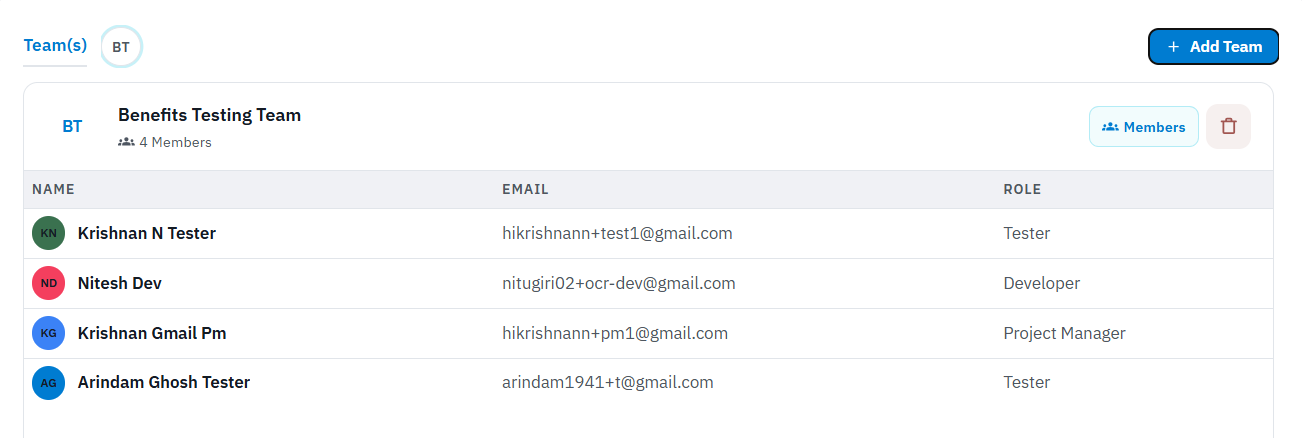
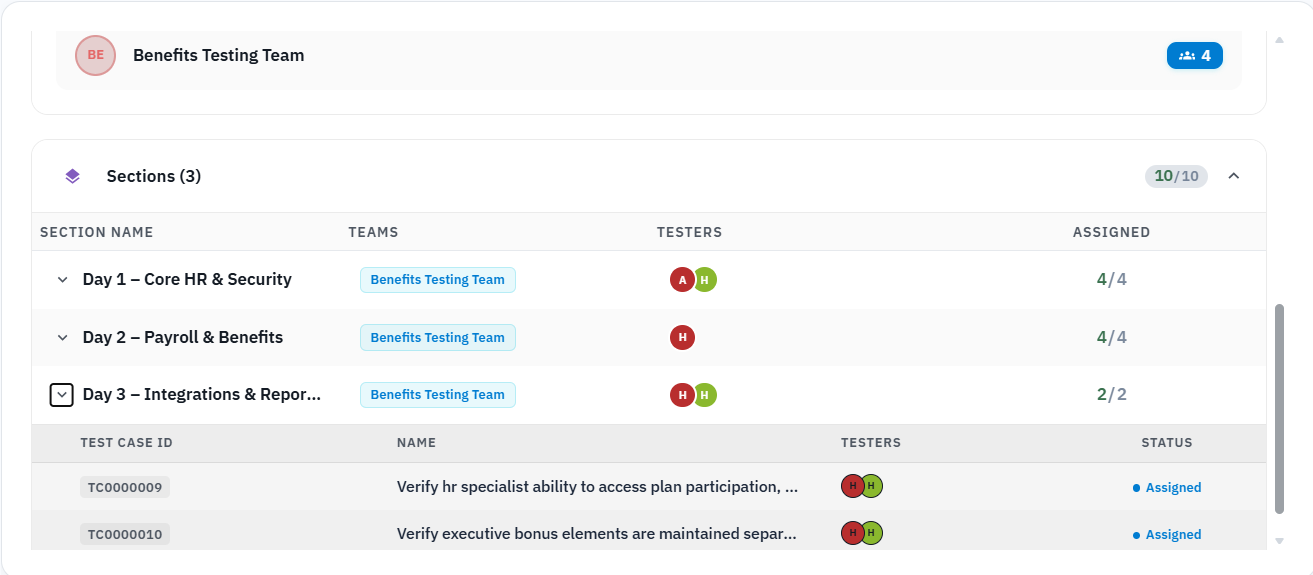
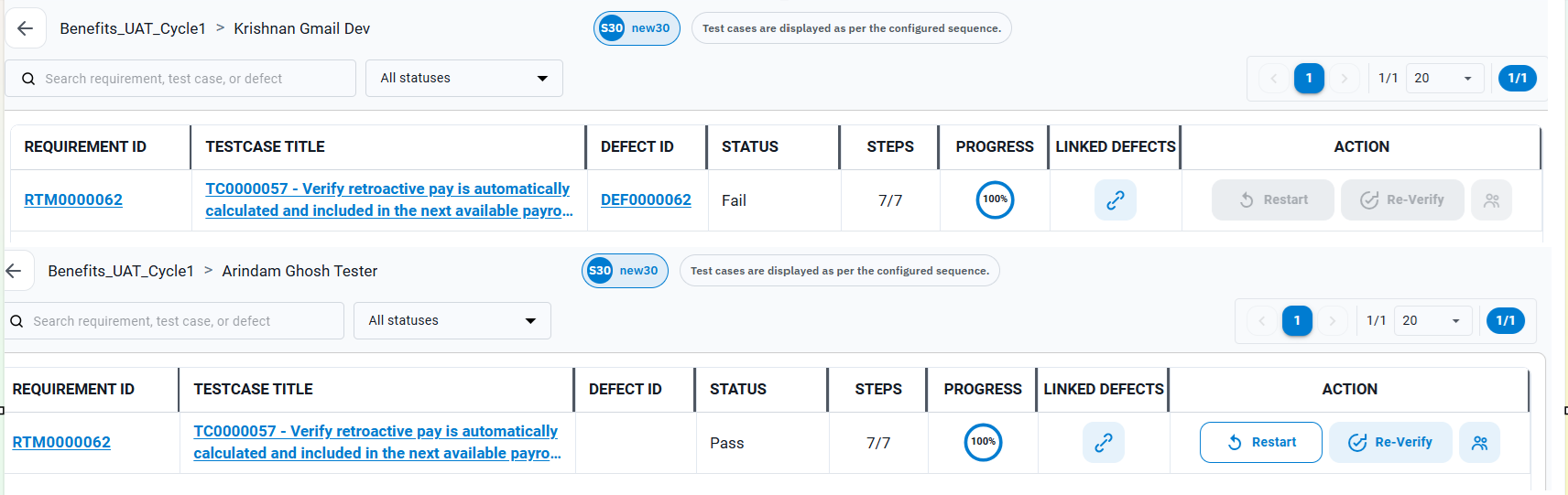
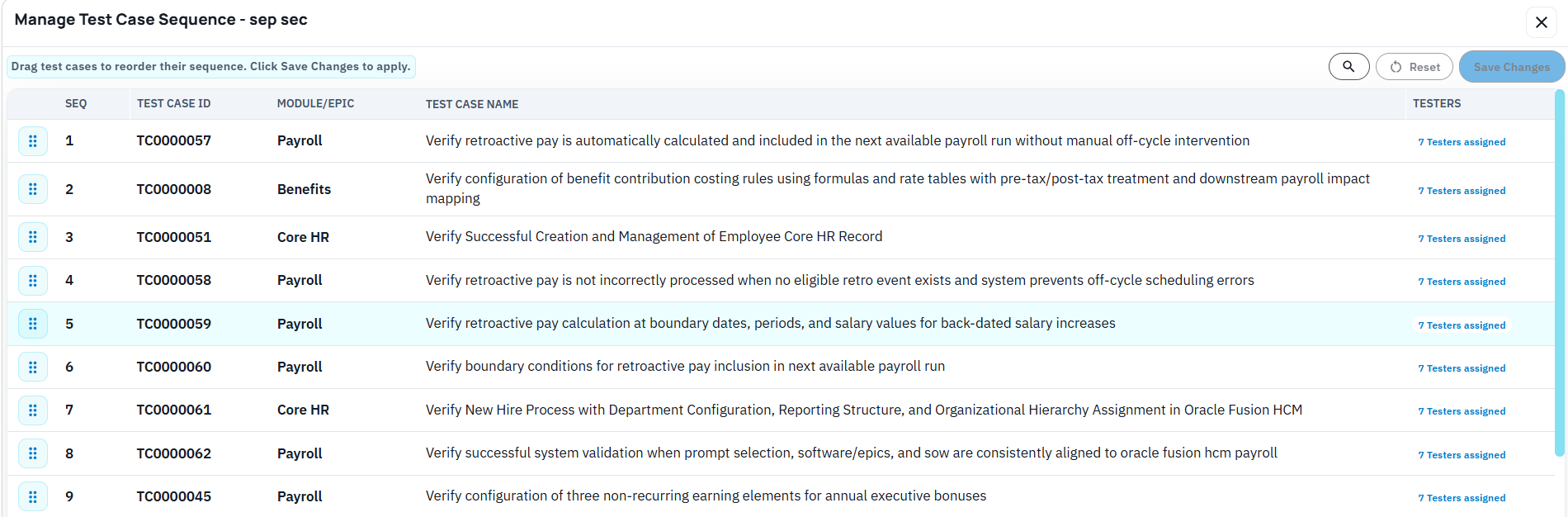
    In BriefSpec, a test cycle is part of the connected implementation record. It holds the teams and their members, the test cases, the instructions the testers were given, the assignments that say which tester owns which case, and every execution result. It also sits alongside requirements, defects, project phases and traceability, so testing is not isolated from the rest of the implementation lifecycle. Cloning a cycle means cloning that structured object, and choosing how much of it comes along.

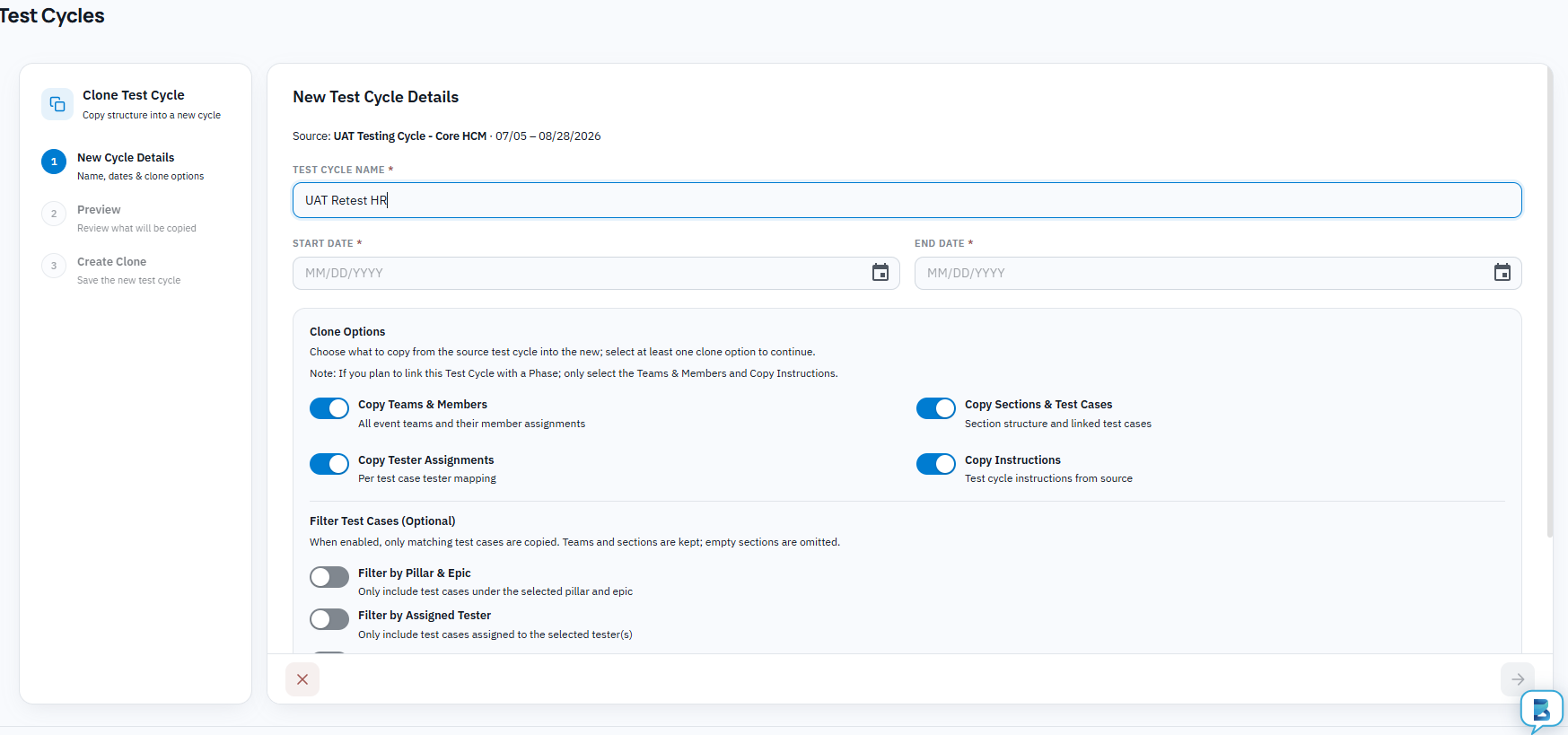
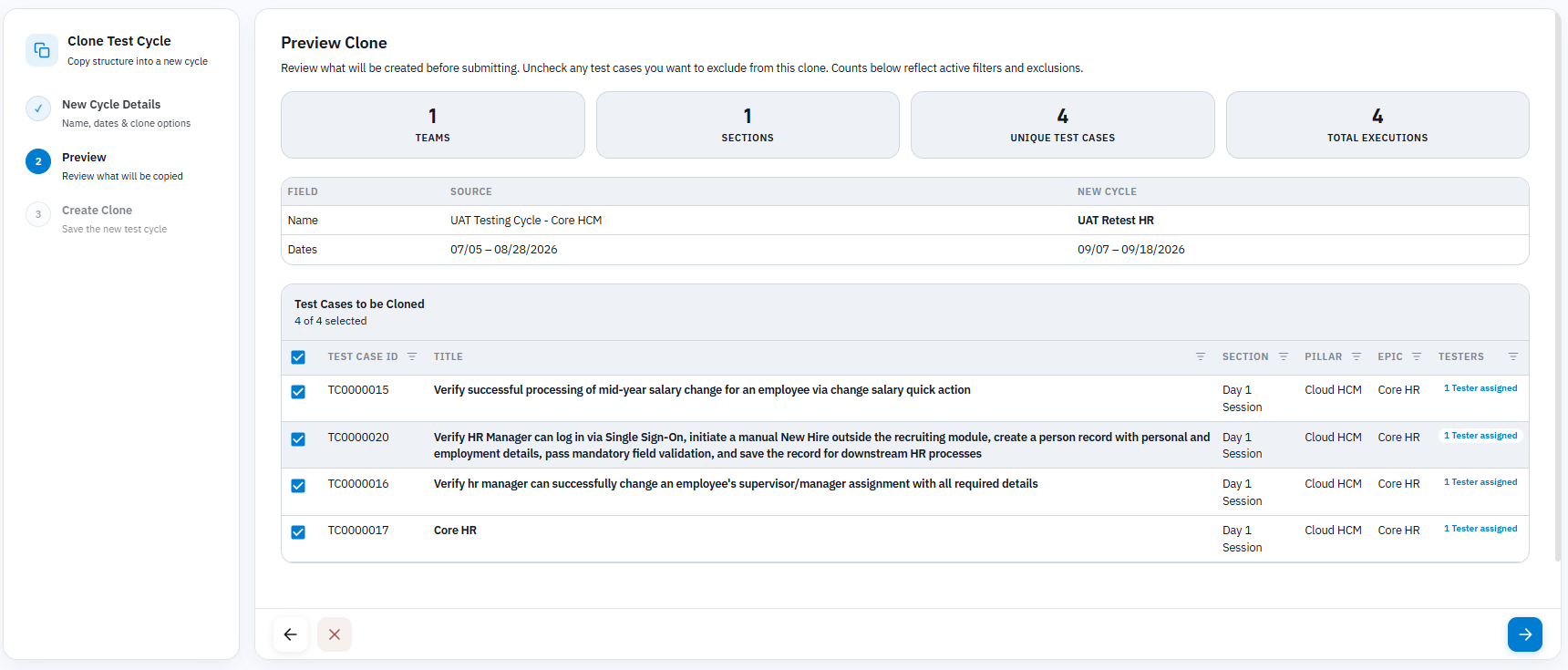
    Cloning a cycle is handled in one dialog. Everything the original cycle knew about who tests what comes with it.

    A full clone brings everything: the teams and team members exactly as they were, every test case, the instructions, and every assignment, with the execution status of every case reset to blank. That is the “run the entire cycle again” request answered without rebuilding the tracker. The testers who ran cycle 1 find cycle 2 in their queue with the same cases, and the project manager’s live view starts at zero without a single sheet being redistributed.

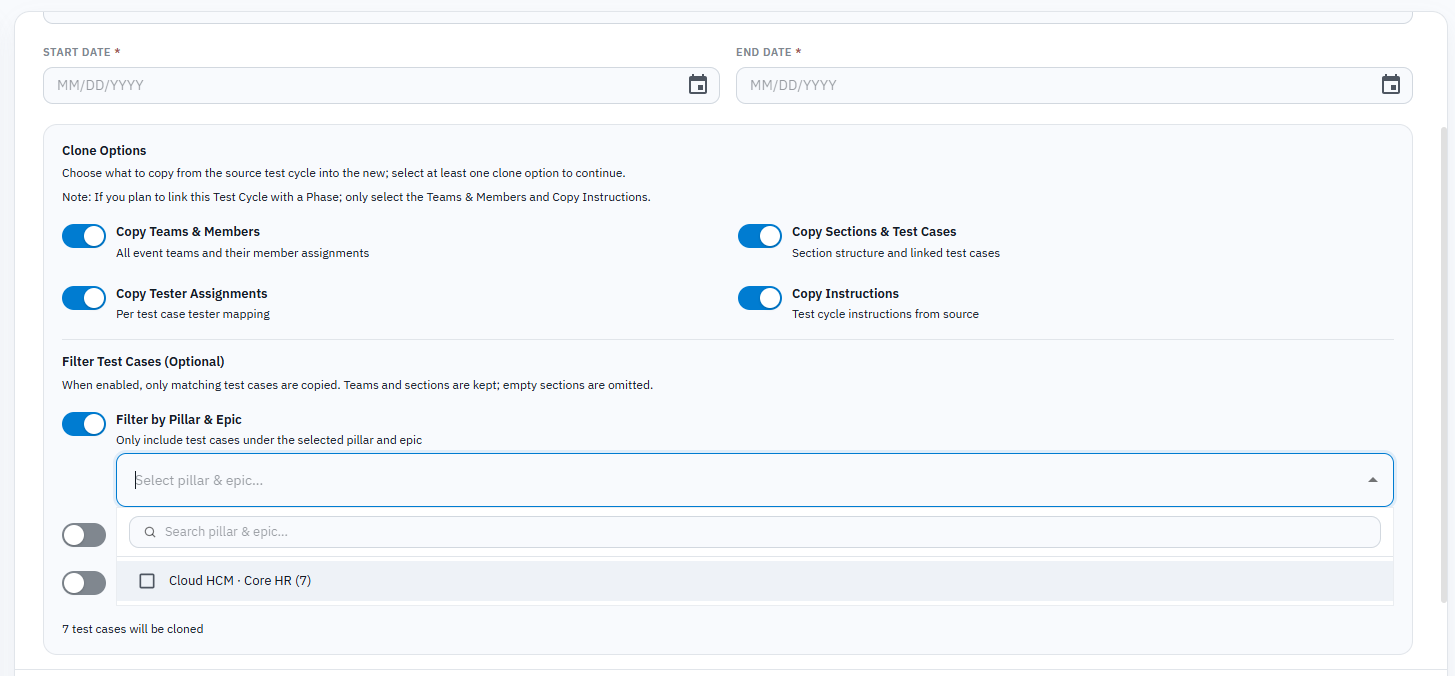
    A partial clone applies filters before the copy. You can bring in only the cases belonging to a workstream or an epic, which is how you answer “re-run payroll after the redesign” without touching benefits or core HR. You can bring in only the cases assigned to a specific tester, which is how you hand a departed tester’s caseload to their replacement as a clean cycle, or re-run one person’s work after an audit finding. And you can bring in only the cases with a given execution status, which is the familiar “failed and blocked only” retest, except the assignments and the team structure come with it.

    Filters can combine by workstream, epic or module, tester and execution status, so the retest scope reflects the implementation structure.

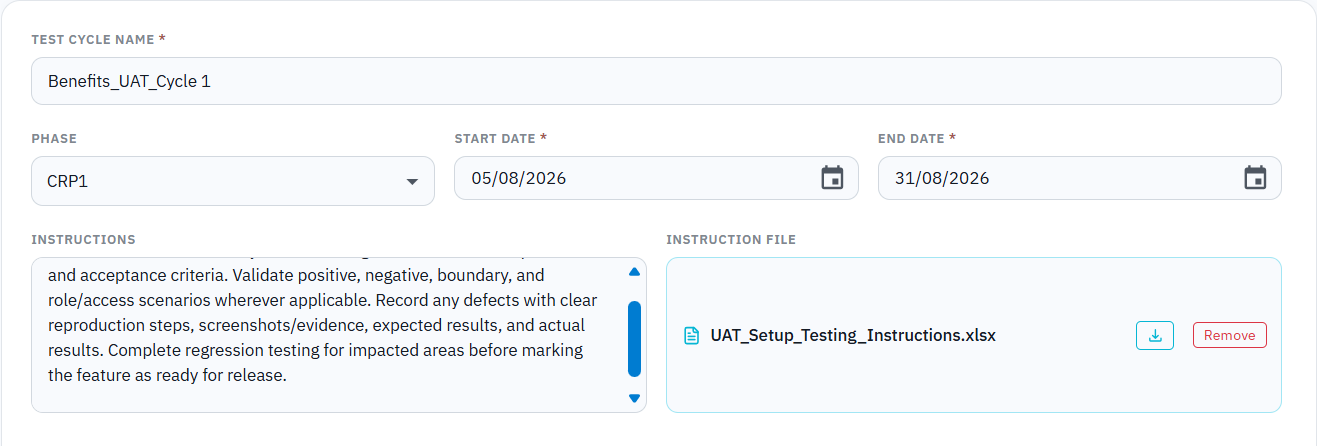
    The instructions can be edited on the clone before it is released, because a retest usually has a different brief from the original: this time, attach evidence for every step, or this time, use the refreshed data set.

    Because each cycle is its own object, cycle 1 keeps its results. Nothing is overwritten. The trace from requirement to test case to defect to retest is intact, which is what an auditor asks for and what a steering committee needs when it wants to know whether cycle 2 actually improved on cycle 1.

    What changes for the project

    The practical effect is that a retest stops being a project management event and becomes a configuration step. When the customer asks for the whole cycle again, the answer is yes, and the cycle can be live the same day. When a vendor release lands, the regression retest is a filtered clone of the last cycle rather than a fresh build. When a tester leaves, their cases move to a new owner as a cycle of their own, and the new person starts with a clean slate and the original instructions.

    None of that removes the reason for the retest. The defects are still real and the release still has to be tested. What it removes is the rebuild work that used to sit between the request and the first re-executed case, and the assignment errors that used to surface a week later when someone noticed nobody owned the day-two cases.

    Software retest FAQ

    Why do retests happen in UAT?

    UAT retests happen when business users cannot accept the first execution result. Common reasons include open defects, missing evidence, late configuration changes, refreshed test data, vendor releases, tester turnover or scope changes that affect previously tested processes.

    Should passed test cases be retested?

    Sometimes. If the change is narrow and evidence is strong, a project may retest only failed or affected cases. If the environment, release, data set or core design changed, the customer may reasonably ask for passed cases to be re-executed as part of regression or acceptance coverage.

    What should be copied into a retest cycle?

    A retest cycle should copy the relevant test cases, team assignments, tester ownership, cycle instructions, workstream or module context, requirement links, defect links and evidence expectations. It should not overwrite the original execution result.

    How is a retest different from regression testing?

    Retesting verifies that a specific failed or affected item now works. Regression testing checks whether a fix, release or configuration change broke related functionality. In enterprise implementations, the two often overlap because a defect fix or vendor release can require both targeted retesting and broader regression coverage.

    If your team is preparing for SIT, UAT, regression testing or a payroll parallel run, BriefSpec can help preserve cycle scope, assignments, instructions, defects and traceability in one connected implementation workspace. Request a BriefSpec pilot to test cycle cloning on one active implementation or upcoming retest.

  • Conducting a UAT cycle in BriefSpec, from setup to sign-off

    Conducting a UAT cycle in BriefSpec, from setup to sign-off

    In short: This is a practical walkthrough of how a user acceptance testing cycle runs on BriefSpec: preparing the test cases, setting up the cycle, what the testers see during the event, what the PM sees, how defects and retests flow, and what you have in hand when the cycle closes. If you manage UAT events, this guide shows you how to run a cycle that is faster, clearer and fully traceable from start to finish. It is for the people who run these events. If you want the argument for why UAT deserves a real platform, we have written that separately. This one is about the mechanics.

    I have sat through more UAT events than I can count, usually as the solution architect in the room while the PM tried to hold the event together with a folder of spreadsheets. The pattern was always the same: test cases in Excel, one sheet per tester, results emailed back whenever the tester got to it, and the PM spending evenings reconciling it all into a picture that was stale by the next morning. BriefSpec was built to run that same event as one connected exercise. Here is how it works, in the order you would actually do it.

    The week before: getting the test cases ready

    A UAT cycle is only as good as the cases in it, and this is where most of the preparation time goes on a traditional project. BriefSpec shortens it in two ways.

    If your organization already has a test case repository, you upload it as it is. BriefSpec supports common formats and sources including Excel files, CSVs, and direct imports from tools such as Jira. The AI maps the columns into BriefSpec’s test case library, and from that point, the platform learns how your organization writes test cases: the level of detail, the step structure, and the way expected results are phrased. That is a one-time step.

    New test cases are then generated from the user stories themselves. Select a story and click generate; BriefSpec reads the story, the comments underneath it, and the knowledge in your environment, and drafts the case in your organization’s style. Where the business process spans several stories, select them together, add any context the AI should know, and generate a single end-to-end case. A manual hire that touches core HR, payroll and benefits gets tested the way the business runs it, as one flow, instead of three artificial fragments.

    What you notice after the first few dozen cases is less any single clever output and more the consistency. Every case comes out at the same standard, with the same step detail and the same precision in the expected results, whether it was generated on day one or day forty, for the senior consultant’s stories or the new hire’s. The accuracy holds because each case is drafted from the story and the discussion attached to it rather than from someone’s memory of a workshop. And when a scenario calls for it, the generator covers the ground a rushed consultant skips: the negative case where required information is missing, the boundary case at a character limit.

    The consultant reviews every generated case before it goes anywhere, and reviewing does not mean editing line by line. If a case needs changes, the consultant tells the generator what to change, all of it at once, in plain language, and regenerates; the case comes back with the changes incorporated. Adjusting ten steps takes about as long as describing what is wrong with them. Once the case reads right, it is published, and only published cases can go into a cycle, which sounds like a small rule until you have watched a tester burn an hour on a half-written draft that should never have reached them.

    Setting up the cycle: about an hour

    Creating the cycle itself is four decisions.

    First, the cycle is tied to a phase. UAT Cycle 1 belongs to the UAT phase, which means it knows which requirements it exists to validate, and its results roll up to phase readiness instead of sitting in a folder.

    Second, you define the testing teams the way the business is organized. A payroll team, a benefits team, a core HR team, each with its own internal consultants and customer testers. Customer testers get a dedicated role with cycle-only access through a link, so a business user who joins the project for one week of testing never has to learn the platform. When new testers receive their access link, they are automatically shown a brief onboarding page with instructions for their role, key steps for execution, and tips for using the most important features like passing steps, adding notes, and raising defects. An example walkthrough case is available if they want to practice before starting. Support is on hand through in-platform chat or email if any questions come up. They also cost nothing, however many you invite, which changes the economics of a forty-tester event.

    Third, you group the cases the way the event will actually run. A three-day event might put core HR and security on day one, payroll and benefits on day two, integrations and reporting on day three. A tester opening the cycle on day two sees day two’s cases in the order they should be executed, and nothing else.

    Fourth, you assign the cases, and this is the setting I would ask you to pay attention to: the same test case can be assigned to more than one tester, and every tester’s result is kept separately. The manual hire process gets tested by the HR administrator, the payroll administrator and a manager self-service user, and when the payroll administrator fails what the HR administrator passed, that disagreement is preserved. It is often the most useful finding of the entire cycle. Tools that keep one pass/fail per case and let the last click overwrite the first throw it away.

    Another important aspect is to be able to manage Test case sequencing. The tool allows you to do this through a simple drag and drop.

    Then you launch, and the testers are notified.

    During the event: the tester’s day

    The tester opens their link and sees their cases in sequence. For each step they mark pass or fail, copy the expected result into the actual result instead of retyping it, and add notes or a screenshot at the step where it belongs. There is no spreadsheet to fill in and nothing to email back.

    When a step fails, the tester creates the defect right there, choosing whether to speak their description using their device’s microphone or simply type it in. People do not like writing defects; they are usually happy to talk about them, and BriefSpec lets them do either. The tester says or types what happened in as much detail as they want, for example: “the system let me submit the hire without a salary, and salary should be required for this employee type,” and the AI turns that into a structured defect. The defect already knows which test case, which step, which requirement and which cycle it came from, because it was born there. Nobody retypes context, and no defect arrives as a one-line email that takes three follow-ups to understand.

    During the event: the PM’s view

    While the testers work, the PM watches the cycle move. Who has started and who has not, completion by tester and by section, pass and fail counts, defects raised and their status. When one tester is quietly a day behind, it is visible on day one rather than discovered when their sheet comes back mostly empty. Leadership sees the same live view, which means the Thursday steering question, how is testing going, gets answered by looking rather than by a weekend of reconciliation.

    On the projects I worked on, this view is what the PM was manually assembling every night from fourteen spreadsheets. Here it is a by-product of the testers doing their work, which is the way reporting should be produced.

    Closing the loop: defects and retests

    When a defect is resolved and marked ready for retest, the tester who raised it is notified and asked to retest. The retest result lands against the original case and cycle. That single mechanism replaces the email thread that usually carries this, the one where “is this fixed?” and “can someone recheck?” bounce around until the answer is lost. A defect in BriefSpec is either open, waiting for retest, or confirmed closed by the person who found it, and the cycle shows which.

    When the cycle ends

    This is the part that pays off months later. Because the cycle was tied to the phase and the cases were linked to requirements, closing the cycle leaves a complete record behind: every requirement in scope for UAT, the cases that validated it, every tester’s result, every defect raised and its resolution, and every retest. All records are stored securely, with role-based access controls and encryption applied to ensure that sensitive information is protected throughout the process. Every action in the cycle is tracked, creating a full audit trail so you can see what was changed, when, and by whom. When the customer asks at go-live whether the payroll requirements were validated, the answer is a view, and it is the same record a steering committee or an auditor would see. Nobody assembles evidence after the fact, because the evidence is the work.

    What this adds up to

    Four things, once the mechanics are out of the way.

    The first is structure. A UAT cycle run this way is a governed project event, with teams, days, assignments, independent results, and live progress, rather than a pile of spreadsheets held together by one PM’s evenings. Most of the advantage in this article comes from that structure, before any AI is involved at all.

    The second is that you can start here. A UAT cycle is contained enough to run on BriefSpec while the rest of the project stays wherever it is today. That makes testing the natural way to pilot the platform: run one cycle on one project, compare it against the last cycle you ran on spreadsheets, and decide about the rest of the project afterward. Nothing else has to move for you to find out.

    The third is the quality of what gets produced along the way. Test cases come out consistent and accurate rather than varying with whoever wrote them, and the defects your customer testers raise arrive complete, with the test case, step, and requirement already attached, instead of as one-line emails that take three follow-ups to understand. The artifacts a steering committee or an auditor eventually asks for are simply there.

    And the fourth is the arithmetic. Writing test cases by hand is expert consultant time, hundreds of hours of it on a full implementation, and it is exactly the kind of cost that quietly eats a fixed fee. Generating them from the stories and editing them by describing the change removes most of that effort. The savings show up in hours first and in margin shortly after.

    You can try all of this for free. Create a project, upload your test cases, set up a cycle, and run it. [Try for free at https://briefspec.com/ ]

  • Why We Built BriefSpec

    Why We Built BriefSpec

    Why We Built BriefSpec

    Enterprise project management for software implementations has long relied on a fragmented set of tools. No platform was purpose-built for these programs, forcing systems integrators to use multiple solutions that failed to cover the full lifecycle. As a result, much of the project work occurred outside any formal platform.

    Our experience reflects this reality. Over two decades, our standard toolset included Jira with Xray for defects and test cases, Microsoft Project for planning, Excel for requirements and trackers, SharePoint for documents, Outlook for approvals, and PowerPoint for solutions and key decisions. While each tool served its purpose, they operated in isolation and were not designed for enterprise software implementations.

    The challenges resulting from this fragmented approach are well known to anyone who has delivered such programs.

    Traceability became a concept in name only, not in practice.

    The industry often references the traceability matrix, but in reality, it became a term rather than a functional tool. With requirements, test cases, defects, and approvals scattered across different systems, enforcing traceability throughout the implementation lifecycle was impractical. The matrix was manually assembled for milestones, quickly became outdated, and could not be reliably verified. Answering an auditor’s or executive’s question about a specific requirement’s testing history required days of manual reconciliation across incompatible files.

    Some firms developed custom tools to address specific gaps, and some were effective. However, these point solutions were built on the same fragmented foundation, leaving significant gaps in the market.

    What the standard tools could not model

    The core issue is that enterprise implementations follow a lifecycle that general-purpose tools cannot represent. Requirements originate in a signed statement of work, are elaborated during discovery, demonstrated in CRP cycles, tested in SIT, accepted in UAT, and sometimes validated again in a parallel run. These requirements remain active for extended periods and are re-verified at each stage. Proper support requires features that mainstream tools lack, such as using the SOW as the root of the requirements backlog, freezing requirements at phase boundaries, approvals referencing fixed records, and test cycles where multiple testers can independently run the same test case without overwriting results.

    Additionally, two types of project information lacked any system of record. Key design decisions were stored in PowerPoint, so when team members left, their rationale was lost. Operational dependencies, such as pending file specifications or unpurchased licenses, remained in email, even though these often delayed go-lives. Scope changes were also missed: clients refined requirements in comments or meetings, consultants implemented them, but these changes were rarely reconciled with the contract.

    There was also a clear cost in time. Functional consultants spent hours converting discovery notes into requirement documents. Business users dedicated significant time to documenting defects with steps and screenshots. These are highly skilled professionals, yet much of their time was spent on documentation rather than value-added activities.

    The AI question no one can answer

    With the advent of generative AI, delivery organizations quickly adopted it. Consultants used AI to draft requirements, test leads generated test cases, and testers wrote defect reports. Today, nearly every systems integrator claims AI is part of its delivery methodology.

    However, if asked to quantify the savings AI delivered, there is no clear answer. This is not due to a lack of benefit, but because there is no record of where AI was used. No platform tracks which artifacts were AI-assisted, who reviewed the output, or the difference in effort. Leaders invest in AI for efficiency, but lack metrics to support these claims. In regulated or audited projects, this gap is even more significant, as there is no visibility into where AI contributed to deliverables.

    A second issue is that AI, when used through standalone chat tools, generates artifacts in isolation. Requirements created this way are not linked to their corresponding tests, and defects are not connected to the requirements they impact. While writing effort decreases, the underlying disconnect persists.

    What BriefSpec does about it

    These market gaps led us to develop BriefSpec at Camptra Technologies.

    BriefSpec is a unified platform for the entire implementation lifecycle, including SOW, requirements, phases, test cases, test cycles, defects, decisions, risks, and action items, all interconnected from creation. Traceability is built into the data itself, not assembled as a separate document. The SOW anchors the backlog, requirements are frozen at phase entry, multiple testers’ results on the same test case are preserved independently, and failed tests automatically generate defects linked to their requirement, cycle, and tester.

    AI is integrated within the platform, not used separately. BriefSpec generates requirements from an SOW or discovery transcript, creates test cases from requirements, and allows testers to capture defects by voice, with each artifact automatically linked to the lifecycle. Because AI operates within the platform, its usage is tracked: which artifacts it helped produce, who reviewed and approved them, and what changed during review. This provides clients with transparency, auditors with evidence, and delivery leaders with measurable data on AI-driven savings.

    It is important to note that building a platform like this was not possible three years ago. Advances from OpenAI and Anthropic enabled practical SOW-to-requirement extraction and transcript analysis, while tools like Claude Code and Cursor transformed what a small, experienced team can accomplish in a year. Our understanding of implementation needs comes from two decades of delivery work, but the ability to realize that vision is recent.

    Enterprise implementations relied on patchwork solutions because there was no alternative. Now, there is.

  • Software Development and Enterprise Software Implementation Are Fundamentally Different Projects

    Software Development and Enterprise Software Implementation Are Fundamentally Different Projects

    For a long time, enterprise software implementations have been treated almost like an extension of software development. But the underlying project models are different. A software development project typically operates in a relatively short loop: define what needs to be built, write the code, review it, iterate, and release. An enterprise software implementation has a longer and more interconnected lifecycle. The software already exists. The work is about understanding the business, making design decisions, configuring the platform, converting data, building integrations and reports, managing changes, testing end-to-end processes, and getting the organization ready to operate differently. The center of gravity is not code. It is decisions and solution design.

    Software development vs. enterprise software implementation: software development usually centers on building or changing a product, while enterprise software implementation centers on adapting an existing platform to business processes, data, integrations, controls, testing, and operating change.

    What software development projects optimize for

    Software development projects are usually organized around product requirements, architecture, code, issues, releases, and deployment. Even when the project is complex, the work often moves through a build-oriented rhythm: backlog refinement, development, code review, testing, release, and monitoring.

    That does not mean software development is simple or isolated from the business. Enterprise engineering work can involve security, uptime, integrations, compliance, adoption, and significant stakeholder coordination. But the primary production artifact is still software that is being built or changed.

    What enterprise software implementations optimize for

    Enterprise software implementation is the end-to-end process of configuring, integrating, testing, deploying, and adopting an enterprise platform such as Oracle Cloud, Workday, SAP, UKG, ADP, Salesforce, or a similar business system. The platform provides a product foundation, but the implementation determines how that product will support the organization.

    That shifts the work toward business requirements, functional design, configuration choices, data conversion, integrations, reporting, security, testing, change management, sign-off, and go-live readiness. The most important question is not only whether something was built. It is whether the agreed requirement is reflected in the configured solution, validated through testing, accepted by the business, and ready for operational use.

    Dimension Software development Enterprise software implementation
    Primary objective Build or change software functionality Configure and operationalize an existing enterprise platform
    Core artifacts Backlog items, code, pull requests, builds, releases SOW, scope, requirements, design decisions, configurations, test cases, defects, approvals
    Lifecycle Plan, build, test, release, iterate Scope, discover, design, configure, convert, integrate, test, remediate, train, deploy, support
    Key stakeholders Product, engineering, QA, DevOps, security Business owners, PMO, solution architects, consultants, testers, data owners, security, change leads
    Main risks Defects, technical debt, missed product needs, release instability Scope gaps, poor traceability, incomplete testing, data issues, adoption risk, go-live readiness gaps
    Evidence needed Code history, test results, release notes, issue status Requirements coverage, test execution, defect resolution, approvals, sign-off, audit-ready traceability

    Why generic project tools create lifecycle gaps

    That difference has a major impact on how these projects are managed. Many implementation teams rely on tools originally designed for software development, product management, or generic project tracking, so they spend years bending them to fit. Requirements may sit in one platform, design documents somewhere else, integrations in another repository, decisions in meeting notes, project plans in Smartsheet or Excel, and approvals buried in email or Teams.

    Each tool may do its job reasonably well, but the project itself becomes fragmented. The bigger problem is not the number of tools. It is the loss of traceability across the lifecycle—being able to follow a business requirement through the decisions, solution design, configuration, test cases, defects, approvals, and downstream deliverables that came from it.

    For example, a payroll requirement may originate in the Statement of Work, be clarified during discovery, affect configuration in the payroll module, require a data conversion rule, trigger an integration change, appear in SIT and UAT test cases, generate one or more defects, and require business sign-off before go-live. If those artifacts live in separate spreadsheets, documents, trackers, and message threads, the team may know the information exists somewhere but still struggle to answer a basic question: has this requirement actually been delivered and validated?

    Why AI needs implementation context

    This distinction also helps explain why generative AI’s early, highly visible use cases appeared in software development, especially code generation and app prototyping. Coding was an obvious use case. Tools such as Cursor, Lovable, and Bolt could generate, rewrite, and accelerate code early on.

    But generating code addresses only a relatively small part of an Oracle, Workday, SAP, or Salesforce implementation. Much of the difficult work happens in conversations, design choices, dependencies, test coverage, exception handling, and business decisions. AI has to understand the context of the implementation and connect information across the lifecycle before it can make a meaningful difference. That is a different problem from simply producing code faster.

    In implementation work, AI is most useful when it is grounded in live project context: the SOW, requirements, workstreams, project phases, test cases, test execution results, defects, ownership, decisions, and approvals. Without that connected context, AI can draft content, but it cannot reliably answer implementation questions such as which requirements lack test coverage, which defects block a workstream, or which scope items still need business approval.

    What purpose-built implementation execution requires

    Enterprise implementation teams need more than a task list. They need a structured and traceable execution model that connects the work from scope through go-live. At a minimum, that means:

    • Structured requirements that can be traced back to source documents such as the SOW, discovery notes, and design decisions.
    • Connected project plans and phases that show how workstreams, milestones, ownership, and delivery progress relate to scope.
    • Formal test cycles for SIT, UAT, regression testing, payroll parallel testing, and readiness testing.
    • Requirements-to-test traceability so teams can see which requirements are covered, executed, passed, failed, or blocked.
    • Defect management that links issues back to requirements, test cases, owners, severity, and go-live impact.
    • Implementation intelligence that lets project teams ask questions against live project data instead of manually reconciling spreadsheets and documents.

    This is where the implementation project model diverges most clearly from the software development project model. A development team may ask what needs to be built next. An implementation team also has to ask what was agreed, what changed, what was configured, what was tested, what failed, who approved it, and whether the business is ready to operate with the new process.

    The project model matters before the AI model

    I think this is the distinction we often miss when discussing the future of enterprise project execution. In many cases, software development centers on building or changing a product, while enterprise software implementation centers on adapting an existing platform to business processes, data, integrations, controls, and operating change. The workflows, information, dependencies, and evidence that need to be managed are fundamentally different.

    Yet teams often continue to run both using largely the same class of tools—and then fill the gaps with more spreadsheets, more trackers, and more manual coordination. Before asking how AI will transform enterprise implementations, we first need to acknowledge that these projects were never simply software development projects to begin with.

    If your implementation requirements, test cases, defects, decisions, and project status are spread across spreadsheets and task trackers, BriefSpec provides a connected implementation workspace built for traceability from scope through go-live. BriefSpec helps enterprise implementation teams connect requirements, project plans, testing, defects, documentation, and implementation intelligence in one place, with AI grounded in actual project data and governed by human review.

    FAQ

    Is enterprise software implementation the same as software development?

    No. Software development typically focuses on building or changing software. Enterprise software implementation focuses on configuring, integrating, testing, deploying, and adopting an existing platform so it supports agreed business requirements and operating processes. Implementation projects may include development work, but they are not primarily code-production projects.

    Why do ERP and enterprise software implementations need traceability?

    Traceability connects scope and requirements to design decisions, configuration, test cases, test results, defects, approvals, and go-live evidence. Without traceability, teams struggle to prove whether requirements were delivered, whether testing coverage is complete, and whether open issues create business or go-live risk.

    How is AI different in implementation work than in coding?

    In coding, AI can assist directly with generating, editing, and explaining code. In enterprise implementation work, AI needs connected project context. It must understand requirements, workstreams, configurations, test cycles, defects, decisions, and approvals to support useful implementation intelligence rather than producing isolated drafts.

  • Excel vs. BriefSpec: Why Spreadsheets Fall Short for Implementation Governance

    Excel vs. BriefSpec: Why Spreadsheets Fall Short for Implementation Governance

    Excel vs. BriefSpec: Why Spreadsheets Fall Short for Implementation Governance

    Quick summary: Excel is useful for ad-hoc tracking, but enterprise implementation teams often outgrow spreadsheets when scope, requirements, testing, defects, approvals, and go-live readiness need to stay connected. This article compares Excel, generic project tools, and BriefSpec for implementation governance, with a focus on traceability, methodology control, reporting, AI assistance, and delivery confidence.

    Implementation governance software connects scope, requirements, project phases, test cases, defects, approvals, reporting, and documentation so teams can prove what changed, what has been tested, and whether the implementation is ready for go-live.

    Short answer: Excel can manage parts of an implementation, but it is not an implementation governance system. For complex ERP, HCM, payroll, finance, or CRM implementations, teams usually need a connected implementation lifecycle that links requirements, test cases, defects, project phases, scope decisions, and reporting in one governed workspace.

    Picture the scene. Your team is six months into an Oracle Cloud or Workday implementation. The project plan lives in one spreadsheet, requirements in another, and test cases in a third. Someone updates a requirement on Tuesday, but the traceability matrix still points to the old version. By Friday, a scope dispute lands in your inbox, and you spend the weekend reconciling versions to figure out what was actually agreed.

    This is the reality of running an enterprise implementation on unmanaged spreadsheets, emails, and shared drives. It is not just a process failure—it is a structural one. Spreadsheets are flexible and familiar, and many teams already have them available, but they were not designed to govern a complex implementation lifecycle. Teams can approximate controls with templates, formulas, permissions, protected ranges, and Microsoft 365 version history, but those controls depend on configuration and discipline rather than an implementation-specific data model. The result is often methodology drift, broken traceability, and scope disputes that erode margins and delay delivery.

    Generic tools like Jira and Smartsheet are often the next stop. They add structure, collaboration, workflow, and reporting capabilities, but they are not purpose-built for implementation governance. Teams can configure them to connect requirements, testing, and defects, sometimes with test management apps and custom workflows, but the implementation lifecycle still has to be modeled and maintained. That leaves teams managing governance conventions across tools instead of working from one connected implementation record.

    BriefSpec takes a different approach. It is an AI-native project execution platform built specifically for enterprise software implementations. Instead of a patchwork of spreadsheets and disconnected tools, BriefSpec provides a connected lifecycle—from SOW extraction through requirements, phases, testing, defects, and traceability. Teams get end-to-end visibility and real-time insights, reducing manual effort and helping identify risk earlier. The AI is practical and context-aware, grounded in your actual project data to accelerate artifact creation—while keeping human review firmly in control.

    The question is not whether spreadsheets can support parts of implementation work. They can. The real question is what it costs your team, your margins, and your client relationships when governance-critical artifacts are spread across files and tools that do not share one implementation lifecycle. This article breaks down where spreadsheets fall short, why generic tools require workarounds, and how a purpose-built platform like BriefSpec supports delivery confidence from kickoff to go-live.

    Evaluation Criteria: What an Implementation Governance Tool Must Deliver

    Before comparing Excel and BriefSpec head-to-head, it helps to define what an implementation governance tool actually needs to do. Generic project management software was not designed around every artifact and relationship in an enterprise software deployment—and spreadsheets certainly were not. The criteria below reflect the realities of running Oracle Cloud, Workday, SAP, or Salesforce implementations, where scope disputes and methodology drift are constant threats.

    Traceability: Linking Every Artifact to Go-Live Readiness

    Traceability is the backbone of implementation governance. It means being able to follow a requirement from its origin in the SOW through design, build, testing, and defect resolution—and then prove that connection during an audit, sign-off review, or scope dispute. In spreadsheet-based workflows, traceability is often manual and fragile. You might have a column for requirement IDs, but the spreadsheet does not natively know that a test case must map to a requirement, or that a defect is tied to the test that uncovered it. A purpose-built tool should maintain these links structurally, so you can trace any requirement to its test coverage and defect status quickly—not after a week of reconciliation.

    Governance: Enforcing Methodology and Version Control

    Governance is about making sure the team follows the agreed methodology—whether that is a waterfall phase-gate approach or a hybrid agile model—and that important changes are recorded. Excel and Microsoft 365 can provide version history, co-authoring, permissions, protected sheets, and administrative audit visibility depending on configuration. The limitation is that those capabilities are file-centric, not implementation-lifecycle-centric. You can still end up with files named requirements_final_v3_rev2.xlsx and no shared understanding of which baseline governs testing. An implementation governance tool should support structured phases, sign-off evidence, traceability, and change context across artifacts, so the team can defend decisions made months earlier.

    Collaboration: Real-Time Access Without Version Conflicts

    Enterprise implementations are inherently collaborative. You have functional consultants, technical teams, PMO leads, and client stakeholders all needing to view and update the same artifacts. Modern Excel workbooks can support real-time co-authoring when stored in OneDrive, SharePoint, or Teams. The problem appears when files are emailed, copied, exported, edited offline, or maintained outside a governed workspace. The result is version conflicts, duplicated effort, and the dreaded “which file is the source of truth?” question. A governance tool should give every stakeholder access to the same connected implementation data, with governed access controls and change tracking that preserve shared context.

    Reporting: Automated Status and Risk Visibility

    Status reporting in a spreadsheet-led environment is usually a manual, error-prone chore. Someone has to consolidate data from multiple files, reconcile discrepancies, and build a dashboard that may be outdated the moment it is shared. That is not just tedious—it is risky, because decisions get made on stale information. An implementation governance tool should generate status reports and risk indicators from live project data. When a test phase slips or a defect backlog grows, the tool should surface that risk in real time, so the PMO can act before it becomes a go-live blocker.

    AI Assistance: Practical, Context-Aware Support Grounded in Project Data

    AI in implementation governance is often either overhyped or underused. The right approach is practical: AI that helps you create artifacts—like requirements, test cases, or status summaries—by drawing on the actual data in your project. Microsoft Copilot in Excel can assist eligible users with analysis, formulas, summaries, and data insights, but it is not an implementation-lifecycle model connecting SOWs, requirements, tests, defects, and phases. The value is in reducing manual effort, not in removing the implementation professional from the loop. Every artifact still needs human review and approval.

    Excel for Implementation: The Hidden Costs of Spreadsheet Governance

    Excel is everywhere in enterprise implementations, and for good reason. It is universally familiar, often already approved inside the organization, and can be shaped to fit almost any ad-hoc tracking need. A consultant can spin up a requirements log in minutes, a PM can track action items without waiting for IT, and the incremental cost may be low if the organization already licenses Microsoft 365. For small, short-lived efforts, that flexibility is genuinely useful.

    But the same flexibility that makes Excel convenient also makes it difficult for governance-critical work. In unmanaged spreadsheet workflows, version control, structure, and auditability depend on how carefully teams configure and follow the process. When a requirements document is emailed to three reviewers and each returns their own edited copy, you now have four versions of the truth. Someone merges them manually, introduces errors, and the next person downstream builds test cases against the wrong baseline. That is not a people problem; it is a predictable outcome when the implementation lifecycle lives in disconnected files.

    Where Spreadsheets Break Down

    The problems compound as the implementation scales. Consider what happens during a typical Oracle Cloud or Workday deployment. Requirements live in one workbook, the project plan in another, and test cases in a third. Traceability—the link from a business requirement to a test script to a defect—requires cross-referencing across files or carefully maintained formulas and IDs. When a requirement changes, there is no implementation-native mechanism to flag all affected test cases, defects, approvals, and owners. The connection is only as good as the team’s discipline, and discipline is hard to sustain under deadline pressure.

    Version conflicts are the most visible symptom, but the deeper issue is the loss of context. A spreadsheet cell might show that a requirement was modified, and Microsoft 365 may retain file version history, but the workbook does not inherently connect that change to downstream test coverage, defect status, project phase, scope approval, and go-live readiness. That connected context is exactly what you need during an audit, sign-off review, or scope dispute.

    When Should Teams Move Beyond Excel?

    Teams should move beyond Excel when the implementation requires formal SIT or UAT cycles, requirements-to-test traceability, defect management, multiple workstreams, client sign-off, or recurring executive reporting. At that point, the spreadsheet is no longer just a tracker; it is being asked to operate as a system of record for the implementation lifecycle.

    The Real Cost: Rework, Delays, and Margin Erosion

    For systems integrators and consultants, the consequences are direct. Poorly governed changes can create scope creep, because work gets done before the approval evidence is clear. Broken traceability can lead to rework, because testers validate against outdated requirements. And manual reporting—assembling status updates from a dozen spreadsheets—consumes hours that should go into the implementation itself. Each of these pressures can push the go-live date out and eat into the margin that made the project worth taking in the first place.

    None of this is a knock on the people managing the spreadsheets. They are doing the best they can with a tool that was not designed to be the system of record for an enterprise implementation lifecycle. The question is whether the team can afford to keep paying the hidden costs of spreadsheet governance—in rework, in disputes, and in delivery confidence—when purpose-built alternatives exist.

    Generic Tools (Jira, Smartsheet) for Implementation: Gaps in Governance

    Generic Tools (Jira, Smartsheet) for Implementation: Gaps in Governance

    When spreadsheets become unmanageable, many teams migrate to generic project tools like Jira or Smartsheet. These platforms offer clear improvements over unmanaged Excel workflows: real-time collaboration, automated notifications, workflow configuration, dashboards, and a central repository for work items. For software development teams or flexible work management, they can be excellent. But for enterprise software implementations, they still require teams to design and maintain the governance model.

    Built for Development and Work Management, Not the Full Implementation Lifecycle

    Jira is widely used to track software development work, issues, and agile delivery. Smartsheet is a flexible work management platform with grids, workflows, reports, dashboards, activity logs, and approvals. Neither is purpose-built around the structured artifacts of an enterprise implementation—SOW-derived scope, requirements gathering, fit-gap analysis, formal test cycles, defect tracking, traceability, sign-off evidence, and go-live readiness. To approximate that structure, teams must configure custom fields, build workflows, define conventions, and often add specialized apps. Jira plus Xray, for example, can support test management and traceability, but it still requires teams to model implementation artifacts and maintain the configuration.

    Traceability Requires Modeling and Maintenance

    Implementation governance depends on end-to-end traceability—the ability to follow a requirement from the original SOW through design, testing, and defect resolution. Jira can support issue links, custom workflows, dashboards, and test-management add-ons. Smartsheet can support cross-sheet references, workflows, reports, dashboards, cell history, and approvals. The limitation is not that these tools have no governance features; it is that implementation-specific traceability is not the core lifecycle model. Teams still need to decide how requirements, tests, defects, phases, approvals, and reporting should relate—and then keep that model consistent across the project.

    Fragmented Toolchains Create New Risks

    Teams often end up running Jira for tasks, Smartsheet for tracking, Excel for reporting, SharePoint for documents, and a separate test tool for execution. Each tool holds a piece of the project context, but no single tool holds the whole implementation picture. This fragmentation creates new risks: inconsistent status updates, duplicated data entry, weak handoffs, and limited real-time insight across the lifecycle. Reporting becomes a manual exercise of pulling data from each system and reconciling it in a spreadsheet—a process that is time-consuming and prone to error.

    How Is BriefSpec Different from Jira or Smartsheet?

    BriefSpec is designed specifically for the implementation lifecycle. It connects requirements, project plans, phases, testing, defects, documentation, and traceability in one platform. Instead of configuring generic tools to approximate governance, BriefSpec provides an implementation-specific structure—with AI grounded in actual project data to accelerate artifact creation while keeping human review at the center. This purpose-built approach gives teams end-to-end visibility, connected documentation, and earlier risk identification without the same level of manual stitching.

    BriefSpec: Purpose-Built for Implementation Governance

    BriefSpec replaces the patchwork of spreadsheets and generic tools with a connected lifecycle built specifically for enterprise software implementations. Instead of stitching together requirements, test cases, and defect logs across disconnected files, your team works from one source of truth—from SOW extraction through requirements, phases, testing, defects, and traceability.

    That connected structure is what makes governance possible. When requirements, test cases, and defects are linked, you can trace an issue back to its source quickly. No more digging through email threads or reconciling version conflicts just to understand the baseline. The context is preserved in the project workspace, so the rationale behind a decision or a change does not disappear when someone leaves the project or updates a file.

    Practical AI That Accelerates, Not Replaces

    BriefSpec’s AI is grounded in your actual project data. It helps you draft requirements, generate test cases, summarize status, and answer questions about live implementation context—reducing the manual effort that eats into margins. But it never removes the human from the loop. Every AI-generated artifact is reviewable and editable, so your consultants and project teams stay in control of the output. The AI handles repetitive drafting and discovery work; your team applies judgment and expertise where it matters.

    End-to-End Visibility and Real-Time Insights

    With everything connected in one place, you get end-to-end visibility across the implementation lifecycle. Dashboards and reports reflect live project data, so you can spot risk earlier—before it becomes a scope dispute or a missed milestone. Instead of spending hours consolidating spreadsheets for a status meeting, you open BriefSpec and see where requirements, testing, defects, phases, and ownership stand. That visibility also supports formal test cycles, giving you connected evidence for go-live readiness, audit reviews, and sign-off discussions.

    Protecting Margins Through Governance

    Purpose-built governance does more than keep projects organized. It helps protect margins by reducing the conditions that create scope creep and rework. When a client questions a change, you have traceability to show what was agreed, what changed, and how it affected downstream work. That clarity reduces disputes and keeps the project moving forward.

    Head-to-Head: Excel vs. BriefSpec for Implementation Governance

    Head-to-Head: Excel vs. BriefSpec for Implementation Governance

    When you lay Excel and BriefSpec side by side, the differences are not cosmetic. They reflect two different approaches to implementation governance: one that relies heavily on templates, configuration, and individual discipline, and one that builds implementation structure and traceability into the platform itself. The table below summarizes how each handles the criteria that matter most for enterprise software implementations.

    Evaluation Criterion Excel BriefSpec
    Traceability Possible through IDs, formulas, templates, and disciplined process; fragile when artifacts span multiple files or versions Connected traceability across requirements, test cases, defects, and phases—implementation artifacts remain linked and visible
    Governance File-level controls, permissions, and version history may be available in Microsoft 365; methodology enforcement remains process-dependent Supports a structured implementation lifecycle with connected scope, requirements, phases, testing, defects, and change context
    Collaboration Microsoft 365 can support co-authoring, but emailed copies, exports, and unmanaged workbooks can fragment the source of truth Shared implementation workspace designed to keep teams working from the same connected project data
    Reporting Reports often require manual consolidation, formulas, pivot tables, or Power Query across separate workbooks Dashboards and status reporting from connected implementation data
    AI Assistance Microsoft Copilot in Excel can assist eligible users with analysis, formulas, summaries, and data insights, depending on licensing and configuration Context-aware AI grounded in SOWs, requirements, tests, defects, and live project data; accelerates artifact creation with human review

    The pattern is consistent. Excel gives you flexibility, but that flexibility comes at the cost of implementation structure. Every manual link, copied formula, exported report, or emailed file is a point where governance can break down. BriefSpec reduces those failure points by making traceability, project context, and reporting native to the implementation workspace.

    Consider what this means in practice. When a requirement changes mid-implementation, a spreadsheet-led process requires someone to trace the impact across test cases, defects, owners, and status reports—a process that is slow, error-prone, and often skipped under deadline pressure. BriefSpec preserves those relationships in the connected project model, so the team can review affected tests, defects, owners, and project context more quickly.

    The choice is not about whether you can make Excel work. It is about whether you can afford the hidden costs of manual governance—the hours spent reconciling versions, the risks of broken traceability, and the margin erosion from scope creep that goes unnoticed until it is too late. For teams running complex Oracle, Workday, SAP, Salesforce, UKG, ADP, or similar implementations, those costs often justify a purpose-built platform.

    Verdict: Best for Implementation Governance

    So where does that leave your team? The answer depends on what you are governing and how much is at stake.

    Excel remains a reasonable choice for ad-hoc tracking or small, non-critical projects. If you are managing a lightweight rollout with a handful of stakeholders and minimal regulatory exposure, a spreadsheet might be all you need. But the moment your implementation touches multiple workstreams, formal test cycles, or contractual scope, the limitations become liabilities. Version conflicts, broken traceability, and manual reporting are not inconveniences—they are risks that surface as scope disputes and rework.

    Generic tools like Jira and Smartsheet occupy a middle ground. They can handle task management, collaboration, dashboards, workflows, and—in some configurations—traceability. But they were not purpose-built for implementation governance. Teams often end up customizing workflows, building workarounds for requirements-to-test-to-defect relationships, and stitching together reports from multiple systems. That customization effort is real cost, and it may still fall short of the connected structure an enterprise implementation demands.

    Best Fit: Governance-Critical Implementations

    BriefSpec is built for teams that cannot afford those gaps. Systems integrators, enterprise PMOs, and implementation consultants running Oracle Cloud, Workday, SAP, Salesforce, or similar projects need more than a tracking tool—they need a connected lifecycle that preserves context from SOW through go-live. BriefSpec delivers that with structured requirements, phases, testing, defects, project plans, documentation, and traceability in one place.

    The practical difference shows up in daily work. Instead of reconciling spreadsheets and exporting reports, your team works from a single implementation workspace. Real-time insights reduce manual status updates, and AI assists with artifact creation—grounded in your actual project data, always subject to human review. That is not automation for its own sake; it is reducing manual effort where it matters most.

    Choose Based on What You Are Protecting

    If your priority is protecting margins, reducing scope creep, and maintaining connected implementation evidence for sign-off and audit reviews, BriefSpec is the right fit. It is designed to help identify risk earlier, support formal test cycles, and give you end-to-end visibility into go-live readiness. For teams where a failed implementation means financial exposure or damaged client trust, the choice is not about feature lists—it is about delivery confidence.

    Excel and generic tools have their place. But for governance-critical implementations, the cost of fragmentation is too high. BriefSpec gives you the structure, traceability, and control that spreadsheets cannot provide on their own—and that your margins depend on.

    FAQ: Excel Alternatives for Implementation Governance

    Can Excel manage implementation governance?

    Excel can support ad-hoc tracking, requirements logs, issue lists, and simple status reports. It becomes difficult to govern when requirements, test cases, defects, approvals, project phases, and reporting need to stay structurally connected across multiple workstreams and stakeholders.

    What is the best Excel alternative for enterprise implementation governance?

    The best fit depends on the implementation. Spreadsheet alternatives such as Google Sheets or Airtable may help with collaboration. Work management platforms such as Jira or Smartsheet can support tasks, workflows, and dashboards. BriefSpec is purpose-built for enterprise software implementation governance, where teams need connected requirements, testing, defects, traceability, reporting, and project intelligence in one lifecycle.

    How does BriefSpec support requirements traceability?

    BriefSpec connects implementation requirements to related test cases, defects, phases, documentation, and project context. That gives teams a structured view of whether requirements are covered, what has been tested, which defects remain open, and how that evidence affects go-live readiness.

    Does AI replace implementation consultants in BriefSpec?

    No. BriefSpec uses AI to reduce repetitive drafting and discovery work, such as creating first-draft requirements, generating test cases, summarizing status, and answering questions about live project data. Human review, editing, approval, and professional judgment remain central to the process.

    Key takeaways

    • Spreadsheets are flexible, but implementation governance often breaks down when requirements, testing, defects, approvals, and reporting live across disconnected files.
    • Excel and Microsoft 365 can provide collaboration, version history, and general AI assistance, but they do not natively model the enterprise implementation lifecycle.
    • Generic tools like Jira and Smartsheet can be configured for parts of implementation governance, but teams typically still need custom workflows, conventions, and integrations to maintain end-to-end traceability.
    • Purpose-built governance tools like BriefSpec maintain structural links between requirements, tests, defects, phases, and project context, enabling real-time risk visibility and connected evidence for sign-off reviews.
    • AI in governance should be practical and context-aware, grounded in project data to assist—not replace—implementation professionals.
    • Adopting a connected lifecycle platform helps protect margins by reducing scope ambiguity, rework, and manual reporting effort.